How to Use AI for Studying Without Skipping the Learning
A practical AI study workflow: check source material, review generated notes, fix weak flashcards, and test yourself without AI. Includes a worked example.
 Aripsy Study Team
In this article13
AI can turn a long section of study material into a shorter draft. The important question is what you do next: can you check that draft, explain the topic without it, and use the idea in a new question?
This guide gives you a practical workflow for using AI to prepare revision material while keeping the thinking and checking with you. It is not a claim that AI improves grades or replaces teaching.
Quick answer: source, draft, check, retrieve
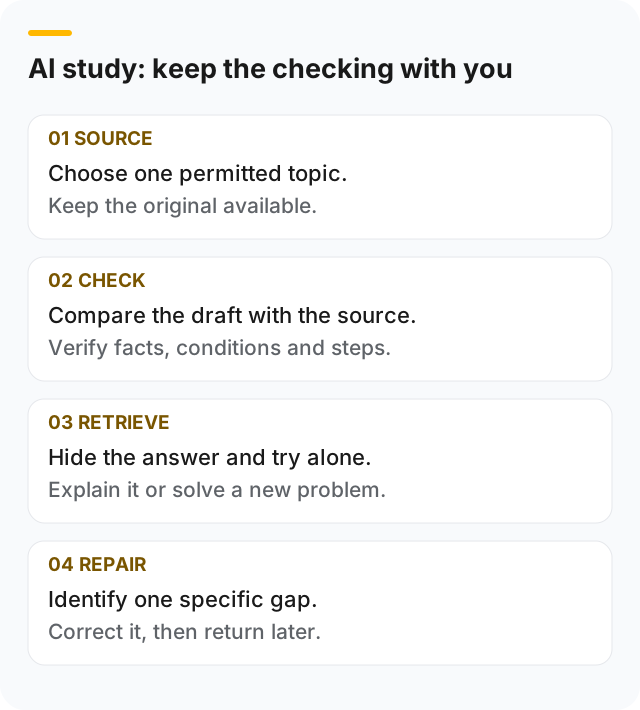
- Choose one topic from material you are allowed to use.
- Ask for a small, focused draft rather than an entire course summary.
- Compare the draft with the source and correct omissions or errors.
- Turn the checked ideas into specific recall questions.
- Close both the source and the AI output, answer from memory, then check.
If you cannot verify a generated fact, leave it out of your revision notes until you can. Your teacher’s instructions and assessment rules take priority over a tool’s suggestions.
1. Choose material you can verify
Start with a short textbook section, your own class notes, or a lecture extract. Write down its topic and where it came from. That makes a questionable statement easier to trace later.
Avoid uploading someone else’s personal information, confidential material, or content you are not permitted to share with a third-party service. Check your institution’s rules before using AI for assessed work. UNESCO’s guidance on generative AI in education emphasizes human oversight, privacy and appropriate educational use; it is not an endorsement of a particular study app.
For documents, inspect any extracted text before relying on the output. Missing symbols, table columns or diagram labels can change the meaning. A readable paragraph does not prove that a PDF was interpreted correctly.
2. Give the draft a narrow job
A useful instruction for a study assistant is:
Use this source to draft notes on one topic. Separate the core idea, the explanation and an example. Keep conditions and exceptions. Mark anything the source does not establish. End with three questions I can answer without looking.
This is a suggested instruction, not a guarantee that a tool will follow it or identify every error. Where an app offers structured settings rather than an instruction box, choose the relevant topic and output format, then apply the same checks yourself.
Avoid asking for “everything I need for the exam” from a small extract. A tool cannot establish complete syllabus coverage from material you did not provide.
3. Check the reasoning, not just the wording
Here is an original practice example you can use to understand the checking step.
Source problem: solve 3x + 5 = 20.
A draft to reject: “Divide 20 by 3, then subtract 5.” This changes the order of the inverse operations and does not preserve the equation.
A checked note: subtract 5 from both sides to get 3x = 15. Divide both sides by 3 to get x = 5. Substitute back: 3 × 5 + 5 = 20.
The rejected line is an illustrative mistake, not a recorded output from Aripsy or another provider. It shows why a confident-sounding explanation still needs a check.
| Check | What to look for |
|---|---|
| Meaning | Does the shorter version preserve the source’s main point? |
| Conditions | Did it drop an exception, assumption, unit or qualification? |
| Reasoning | Do the intermediate steps support the answer? |
| Coverage | Is a needed idea missing, or is new material presented as if it came from the source? |
| Verification | Can you locate the source or work through a check yourself? |
For a note structure that preserves those details, use the exam-note template.
4. Replace vague flashcards with answerable questions
A flashcard that says “Explain equations” is difficult to assess. Split it into smaller prompts you can mark against a clear answer.
| Weak prompt | More specific prompt | Answer check |
|---|---|---|
| Explain equations | What must you do to the other side when subtracting 5 from one side? | Subtract 5 from the other side too |
| Understand this example | What is the first step in solving 3x + 5 = 20? | Subtract 5 from both sides |
| Remember the answer | Solve 4x + 3 = 19 without the worked example | x = 4; check by substitution |
Keep a worked example for initial understanding, then use a different problem to check whether you can apply the method. Getting the copied example right is not the same as solving a new one.
5. Test yourself without the assistant
Close the generated answer before responding. If you get stuck, identify the missing step, revisit the source, and try again later. Record the specific error rather than asking the assistant to produce more material indefinitely.
The study-techniques guide explains retrieval practice, spaced sessions and mistake logs. Its schedules are adaptable planning examples, not an optimal timetable for everyone.
Match the AI task to the learning problem
Before opening an assistant, finish this sentence: “I need help with…” A clear problem gives you a way to judge whether the output helped.
| Your problem | A useful request | What you still need to do |
|---|---|---|
| A lecture section is disorganised | Group the supplied ideas under descriptive headings | Check that relationships and exceptions survived |
| An explanation feels too abstract | Offer an example using only the supplied concept | Verify the example and explain where it stops fitting |
| You cannot recall a definition | Draft a focused question with a separate answer | Attempt it before revealing the answer |
| You keep choosing the wrong method | Compare two methods already in your notes | Solve a fresh problem and justify your choice |
| You need an assessed essay | Check the permitted support in the assignment instructions | Develop and submit your own work within those rules |
An AI conversation can become a substitute for practice if you keep requesting simpler explanations without attempting anything yourself. After one explanation, pause and write your own answer. That attempt tells you whether you need another explanation, a worked example, or feedback on one step.
Use the source again whenever a generated claim cannot be checked. The final test happens with the answer hidden.
Worked example: check a literature study card
Suppose you are preparing notes on a character’s ambition. Your source is the assigned play and your teacher’s discussion of a particular scene. A useful card asks you to explain how a specific action or line supports an interpretation.
A weak draft might state that “the character is always ambitious” and attach a quotation without an act or scene. There are three separate checking tasks:
- Locate the evidence. Find the quotation in your edition. If you cannot find it, do not memorise it as a real quotation.
- Limit the interpretation. Replace “always” with a claim you can support from the selected passage. Consider a moment that complicates your argument.
- Make the card test reasoning. Ask “How does this moment support the interpretation, and what alternative reading is possible?” Keep the answer separate.
This is an illustrative workflow, not a claim about a particular generated response. For a concrete literature starting point, see the Macbeth summary and revision guide, then return to the play for exact wording and context. A summary helps you find your way through a text; it does not replace evidence from it.
What to do when the output looks wrong
A source or quotation may be invented
Open the original publication, textbook or course material. Check that the source exists and that it supports the specific claim. A real article title with an unrelated conclusion is still an unsuitable citation. Do not treat a link supplied by a model as verification until you have checked its destination.
The source and draft use different terminology
Compare the definitions before assuming they are interchangeable. Keep the terminology your course requires, especially where a shorter everyday word drops a scientific condition. Record an unresolved disagreement as a question for your teacher instead of silently choosing the smoother sentence.
A document contains diagrams or a multi-column table
Read the original alongside the extracted material. Confirm which label belongs to which structure and which heading belongs to each value. If the relationship is missing, describe that section yourself or work from a clearer permitted extract. More generated text cannot restore evidence that never reached the tool.
You can recognise the answer but cannot produce it
Reduce the question to one idea and try again with the answer covered. Then reconnect it to the larger explanation. The active-recall workflow includes ways to move from a definition to an application question.
A small session with a clear stopping point
Choose one learning outcome, prepare a checked note, and answer three questions: one definition, one explanation and one application. Mark each as correct, incomplete or incorrect using your source. Keep only the corrections you need for your next attempt.
Stop generating when you have enough verified material to practise that outcome. If you cannot check a central fact, pause that topic and get help. If you can explain and apply it independently, move to another outcome and schedule a later review. Neither the length of the chat nor the number of generated cards is a reliable measure of what you learned.
For an alternative layout, Stanford’s Cornell note-taking guidance shows how cues can support an explanation followed by checking. You can use that principle with handwritten notes as well as checked AI drafts.
Where Aripsy fits
Aripsy can help turn pasted study text into notes and flashcards. Signed-in Free users get one successful document upload per month; Pro includes unlimited PDF, PowerPoint and Word uploads within its file and study-pack limits. See the current plan details for availability and limits.
Start with a short topic you already have a reliable source for. Check the generated material before using it to revise. Aripsy extracts document text; complex diagrams, equations and formatting need checking against the original. Important details may still be wrong or missing even when the output is fluent.
A checklist before you keep an AI-generated note
- I am permitted to use and share the source material.
- I know which source supports the note.
- I checked facts, units, conditions and worked steps.
- I removed or verified unsupported additions.
- I can answer at least one question with the note closed.
- I know what to revisit after a mistake.
For a more detailed source, coverage, precision and citation audit, use the AI study-notes accuracy checklist.
FAQ
Can AI replace reading my course material?
A summary can help you organize a topic, but it may omit an exception, diagram or explanation you need. Use it alongside the original and your course requirements, not as proof you have covered everything.
Is using AI for revision allowed?
Rules depend on your institution, course and task. Permission to use AI for private revision does not automatically allow its use in an assessed submission. Check the instructions and ask your teacher when unclear.
What should I do if the generated answer conflicts with my notes?
Return to a reliable source and check the disputed step. If the conflict remains, ask your teacher or tutor. Asking the same model to repeat its answer does not independently verify it.
Does making more flashcards mean I am learning more?
Card count does not show whether you can retrieve or apply the material. Prefer a manageable set you can check and practise, then change the cards that are unclear or repeatedly missed.
Try one topic in the study tool, then use the checklist before keeping the result.
Keep exploring
Responsible AI for studying
Review practical boundaries for checking and using AI-generated study material.
Open Responsible AI for studying
Written by
Aripsy Study Team
The Aripsy Study Team creates practical revision guides designed to support learning, source checking, and active practice.