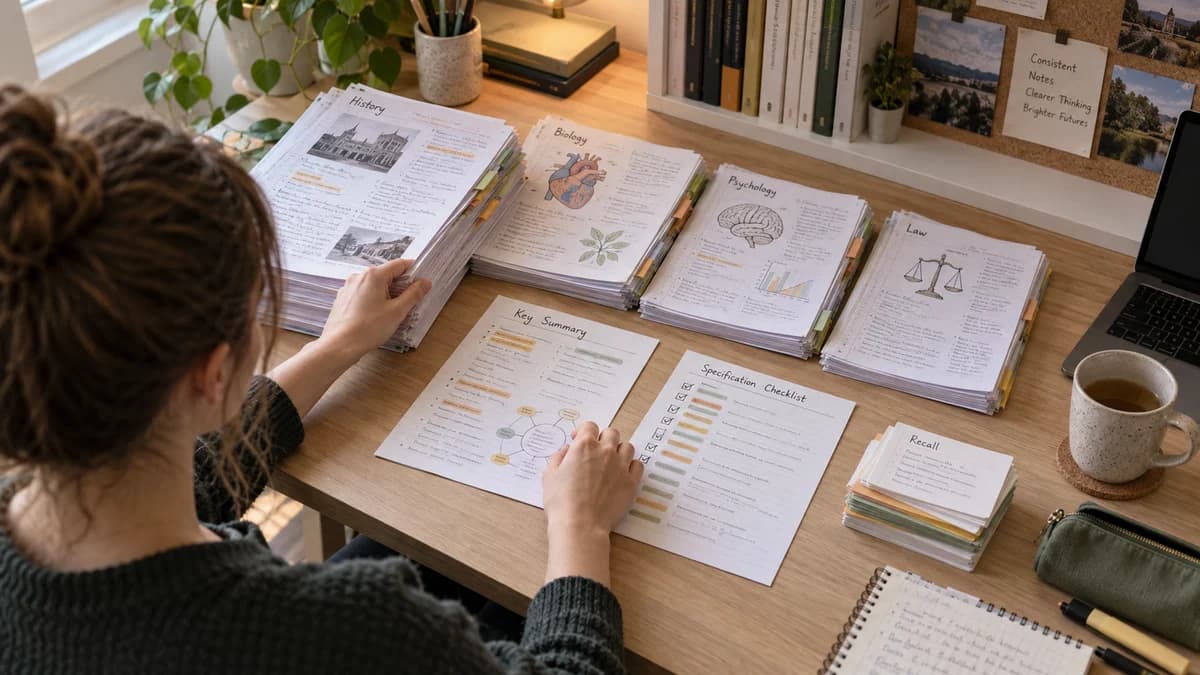
How to Create Clear Exam Notes: A Step-by-Step Method
Make exam-ready notes by mapping one topic to the current syllabus, writing a concise summary, adding examples and practice questions, and correcting the note after testing it. Keep a full checked version for learning and a condensed version for final review, while preserving every condition, method and piece of evidence needed to answer exam questions.
 Aripsy Study Team
In this article21
Clear exam notes are not the longest notes or the prettiest notes. They are notes you can use to understand a topic, recall it later, and answer questions under exam conditions.
This guide gives you a simple method for turning textbooks, class slides, PDF handouts, and lecture notes into revision material that is easier to check and practise from.
Quick answer: how do you make useful notes for an exam?
Start with one syllabus objective, record the core fact, explain how or why it works, add one example, and finish with a question you can answer with the notes closed. After practice, shorten repeated wording and add the mistake that cost you marks. A one-page note is useful when it preserves the information needed to answer questions—not when it forces an entire chapter into tiny writing.
Key takeaways
- Start from the syllabus, specification, or learning outcomes.
- Keep notes short enough to revise from.
- Separate facts, explanations, examples, and mistakes.
- Turn notes into questions as soon as possible.
- Check AI-generated or rewritten notes against trusted source material.
Step 1: Start with what the exam actually expects
Before writing notes, check the course outline, exam-board specification, syllabus, or teacher checklist. This stops your notes from becoming a copy of the whole textbook.
Ask:
- What topic am I revising?
- What command words appear in questions?
- What definitions, formulas, dates, cases, or processes must I know?
- What practicals, diagrams, examples, or case studies are expected?
- What mistakes have I made before?
For GCSE and A-Level subjects, the specification is especially useful. For university courses, use lecture outcomes, seminar questions, reading lists, and past papers where available.
Confirm the notes match the current exam format
Notes can contain correct subject knowledge and still be poorly matched to the assessment. Before treating a page as exam-ready, check the current official specification, syllabus, course guide or exam handbook—not a remembered format or an old revision post.
Confirm:
- the correct qualification, exam board, syllabus code and tier;
- which paper or component assesses the topic;
- current question types, command words and assessment objectives;
- permitted formula sheets, source booklets, calculators or reference materials;
- practical, data, essay or problem-solving requirements;
- the published duration and marks for the relevant paper.
Use official specimen material and past papers to see how knowledge is applied. Do not assume a topic is unimportant because it was absent from one recent paper, and do not copy a mark-scheme phrase without understanding the idea it rewards. Specifications and formats can change, so record the source and edition or year used to check the note.
For example, AQA directs students to current specifications for expected content and skills and provides papers and mark schemes through its official revision resources. Cambridge learner guidance similarly recommends checking the syllabus, paper duration, question requirements and mark allocation.
Step 2: Use a four-part note structure
A useful exam note usually has four parts:
| Part | Purpose |
|---|---|
| Core facts | Definitions, formulas, dates, names, vocabulary |
| Explanation | How or why the idea works |
| Example | A worked example, case, diagram, or application |
| Recall prompt | A question that tests the note |
Example for Biology:
- Core fact: Osmosis is the movement of water molecules through a partially permeable membrane from a dilute solution to a more concentrated solution.
- Explanation: Water moves down a water potential gradient.
- Example: Plant cells become turgid in pure water.
- Recall prompt: What happens to a plant cell in a concentrated sugar solution?
This structure keeps notes connected to retrieval instead of only storage.
Copy this note template for one topic
- Topic and learning outcome: what should you be able to explain or do?
- Source: book section, lecture slide or specification point.
- Core fact: one definition, relationship or rule.
- Explanation: why it works, in your own words.
- Example: a worked problem or application.
- Recall question: something you can answer with the notes closed.
- Correction: what you missed when you tested yourself.
- Next review: when you will try again.
Worked example: shorten a maths note without losing the reasoning
A first draft might read: “To solve 3x + 5 = 20, first subtract five from each side, which gives 3x = 15, and then divide each side by three, giving x = 5.”
A revision note can preserve the steps in less space:
| Part | Note |
|---|---|
| Rule | Apply the same operation to both sides of an equation |
| Steps | 3x + 5 = 20 → 3x = 15 → x = 5 |
| Check | 3 × 5 + 5 = 20 |
| Recall prompt | Solve 4x + 3 = 19 and check your answer |
| Common mistake | Subtracting 5 from only one side |
The practice answer is x = 4: substituting gives 4 × 4 + 3 = 19. Keep the answer covered while practising. The aim is a note that explains the method, not just a copied answer. For subject-specific input, see the math notes tool.
Step 3: Make notes shorter after the first draft
Your first draft can be messy. The second draft should be shorter.
Remove:
- Repeated sentences.
- Examples that do not help.
- Decorative wording.
- Long copied textbook paragraphs.
- Anything outside your syllabus unless it clarifies the topic.
Keep:
- Definitions.
- Formula steps.
- Diagrams or tables that make the idea easier.
- Teacher corrections.
- Mark-scheme phrases.
- Mistakes you have made before.
Good notes should help you revise quickly without hiding important detail.
If an assignment or revision brief has a length limit, use the Aripsy word and character counter to check the shortened draft, paragraph count, and estimated reading time without uploading the text.
Step 4: Turn notes into active recall
After writing a note, create questions from it.
For facts:
What is the definition of osmosis?
For explanations:
Why does a larger concentration gradient increase diffusion rate?
For comparisons:
How is active transport different from diffusion?
For essays:
What evidence supports this argument?
For calculations:
Which formula should be used, and what are the units?
If you cannot answer without looking, the note is not finished. Add the missing detail or make the prompt easier to practise.
Pair every summary with practice questions
A summary compresses information. A question reveals whether you can retrieve and use it. Keep both together so the notes do not become a document you only reread.
For each small topic, build a short question ladder:
| Question level | Purpose | Example |
|---|---|---|
| Recall | Retrieve a fact, term, formula or step | What is osmosis? |
| Explain | Connect the fact to how or why it works | Why does water move across the membrane? |
| Apply | Use the idea in an unfamiliar example | Predict what happens to a plant cell in concentrated solution |
| Check a misconception | Distinguish the correct idea from a tempting error | Does osmosis describe solute movement? Explain |
| Exam-style practice | Use the expected command word and format | Explain the change using water potential |
Keep answers separate or collapsible. A question printed immediately beside a visible answer tests recognition more than retrieval.
After marking, add only the correction that the attempt exposed. If you knew the definition but could not apply it, the note needs a worked application or decision cue—not another copy of the definition.
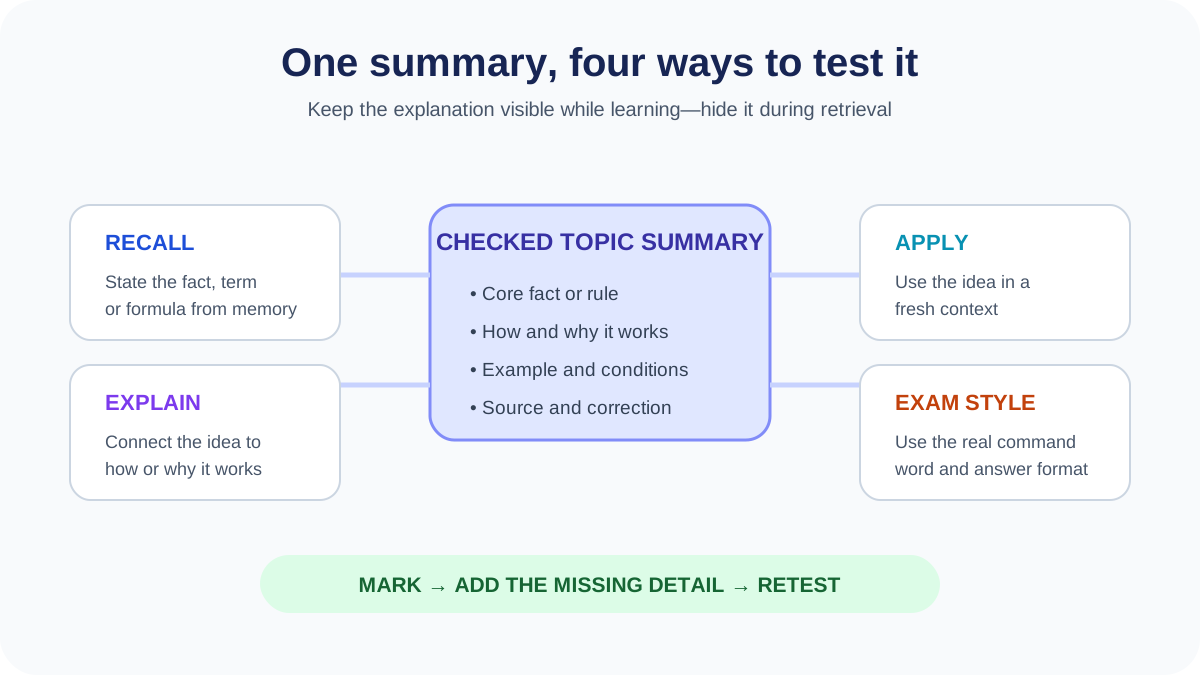
A useful study set has two layers: a checked explanation for learning and questions that can be attempted without seeing it.
Step 5: Add a mistake log
Exam notes become more useful when they include mistakes. After a quiz, past paper, or teacher-marked answer, write down what went wrong.
| Topic | Mistake | Fix |
|---|---|---|
| Electricity | Forgot units | Add unit card for current, voltage, resistance |
| Poetry | Quote not linked to question | Write one paragraph plan |
| Trigonometry | Chose wrong ratio | Do 5 mixed SOHCAHTOA questions |
This makes your notes personal. Two students can study the same topic but need different fixes.
Choose a format that matches the topic
Do not force every subject into the same page layout. Choose the structure that makes the important relationship easiest to check.
| Material | Useful format | Include this check |
|---|---|---|
| Definitions and short explanations | Question-and-answer notes | Can you answer with the explanation covered? |
| Two similar concepts | Comparison table | Are you comparing the same properties? |
| A process or sequence | Labelled flow diagram | Can you explain every arrow or transition? |
| A calculation | Worked steps beside a fresh problem | Can you choose the method without a cue? |
| An essay topic | Claim, evidence and reasoning outline | Does the evidence support this exact claim? |
Visual-note examples that earn their space
Visuals help when position, sequence, comparison or hierarchy carries meaning. They are less useful when decoration takes more room than the idea.
- Process map: use boxes and labelled arrows for stages, inputs, outputs and decision points. Explain every arrow in words.
- Comparison grid: keep the same row categories on both sides so differences are visible and fair.
- Annotated diagram: label only the structures or regions the course requires, then add a question that hides those labels.
- Graph note: include axes, units, pattern, anomalous points and the conclusion the graph supports.
- Worked-example strip: place one complete model beside a similar blank problem rather than several copied answers.
- Essay evidence map: connect each claim to precise evidence, reasoning and a possible alternative interpretation.
Colour should communicate a consistent role—such as source fact, example, warning or correction—not simply make the page attractive. Do not rely on colour alone; add labels or symbols so the note remains usable when printed in grayscale or viewed by someone who distinguishes colours differently.
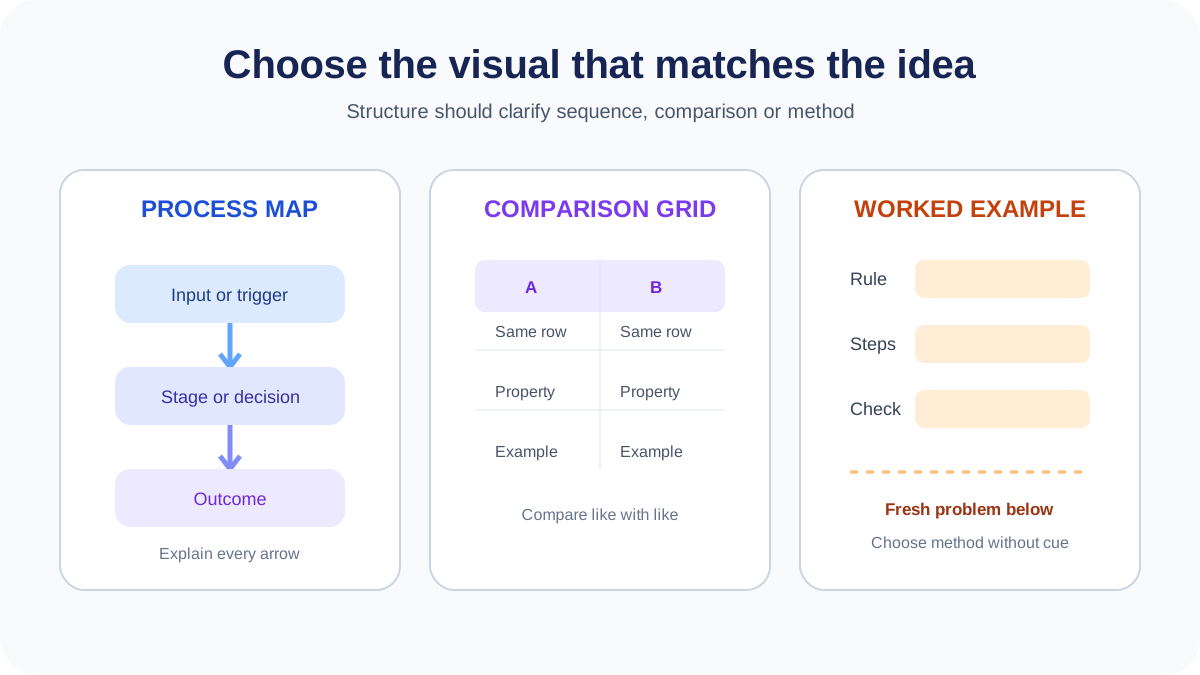
Choose the visual structure because it represents the relationship being tested, not because every topic needs a diagram.
If you prefer a cue-based page, Stanford’s Cornell method guidance explains how to use short cues, a summary and checking. You do not need to reproduce a particular layout to make your notes useful. The important design decision is leaving yourself a way to retrieve the idea before seeing the explanation.
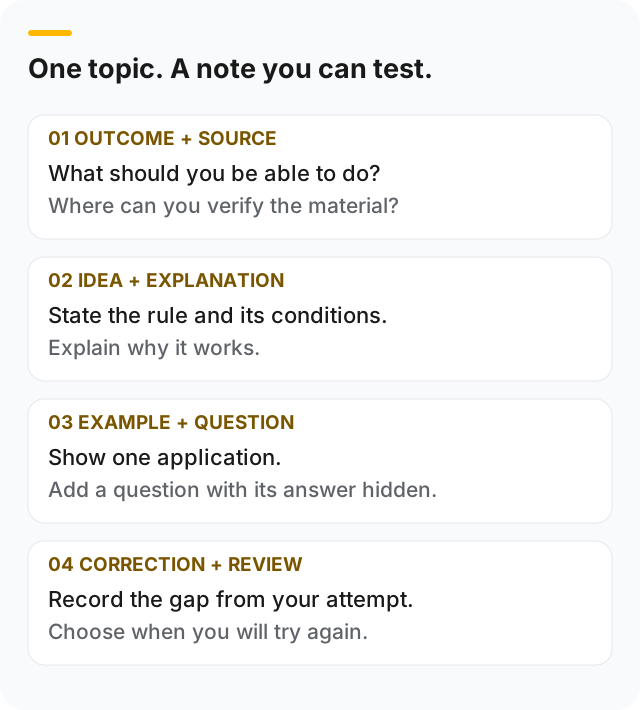
Use this as a checklist for your own page. The source and correction fields make the note easier to verify and update.
Worked example: build an essay note without copying a paragraph
Imagine the task is to discuss how a character changes during a play. A plot summary tells you what happens, but it does not yet give you an argument.
Start with a narrow claim about one stage of that change. Add a scene reference and a short quotation checked in your edition. Underneath, explain which word, action or contrast supports the claim. Finally, note a later scene that might complicate it.
Your note can look like this:
- Question focus: how does the character’s attitude change?
- Claim: one interpretation of their attitude at this point.
- Evidence location: act, scene and your edition’s page reference.
- Reasoning: why the selected evidence supports the interpretation.
- Alternative: another reading or a contrasting moment.
- Recall task: write a short paragraph answering the question without viewing this outline.
This is a reusable planning template, not a model answer to a particular exam. For a text-specific starting point, use the Macbeth summary guide, then check the play and your course requirements. Avoid memorising an entire prepared paragraph that only loosely fits the question you receive.
Turn lecture slides into notes without losing the explanation
Slides often contain headings, images and reminders intended to accompany a spoken explanation. Copying their bullet points may leave you with labels you cannot explain.
- Choose one learning outcome and the slides that address it.
- Add the explanation from your own lecture notes or assigned reading.
- Record which source supports a definition, example or claim.
- Mark anything you cannot explain as an unresolved question.
- Attempt a question that requires using the idea, then revise only the gap it exposes.
For a diagram, preserve the labels and explain their relationships in words. For a graph, record the axes, units and the conclusion the graph supports. If a slide is unclear, ask about that specific point rather than guessing what the lecturer meant.
The same checks apply to generated summaries. The guide to checking AI study material shows how to handle missing context and unsupported additions before keeping them in your notes.
What belongs in a final revision note?
A useful editing question is: “What would become harder to explain or solve if I removed this?” Keep a condition that changes a rule, a unit that changes a calculation, and an example that clarifies an unfamiliar idea. Remove duplicate explanations that do no additional work.
Do not shorten “apply the same operation to both sides” into “move it across” if that hides why the algebra works. Similarly, a keyword list may be too compressed if you cannot reconstruct the explanation from it. Try the recall question before deciding the shorter version is sufficient.
Keep your full course materials separately. Revision notes are a working selection, not proof that every assessed topic has been covered. Maintain a simple checklist of learning outcomes and mark which ones you have checked through practice.
Build a last-minute condensed-note workflow
Last-minute notes should be the final layer of an existing revision system, not an attempt to rewrite the entire course the night before an exam.
Use three versions:
- Full checked note: the explanation, evidence, method, examples and sources needed to understand the topic.
- One-page topic summary: core relationships, conditions, formulas, diagrams, common errors and a short question set.
- Final recall sheet: cues only—headings, formulas, command-word reminders, mistake triggers and questions whose answers you can reproduce.
Condense after testing. If you repeatedly forget a condition, keep it visible. If an idea can be reconstructed reliably from a short cue, remove the repeated explanation from the final sheet but retain it in the full note.
A 20-minute condensation pass
| Time | Action |
|---|---|
| 5 minutes | Check the topic against the current syllabus and your mistake log |
| 5 minutes | Circle the facts, conditions, methods and evidence you still miss |
| 5 minutes | Turn those points into short cues or questions |
| 5 minutes | Close every source and answer the cues; restore anything essential that was lost |
Do not shrink text until a dense page becomes unreadable. Fewer, well-chosen cues are more usable than an entire chapter compressed into tiny type.
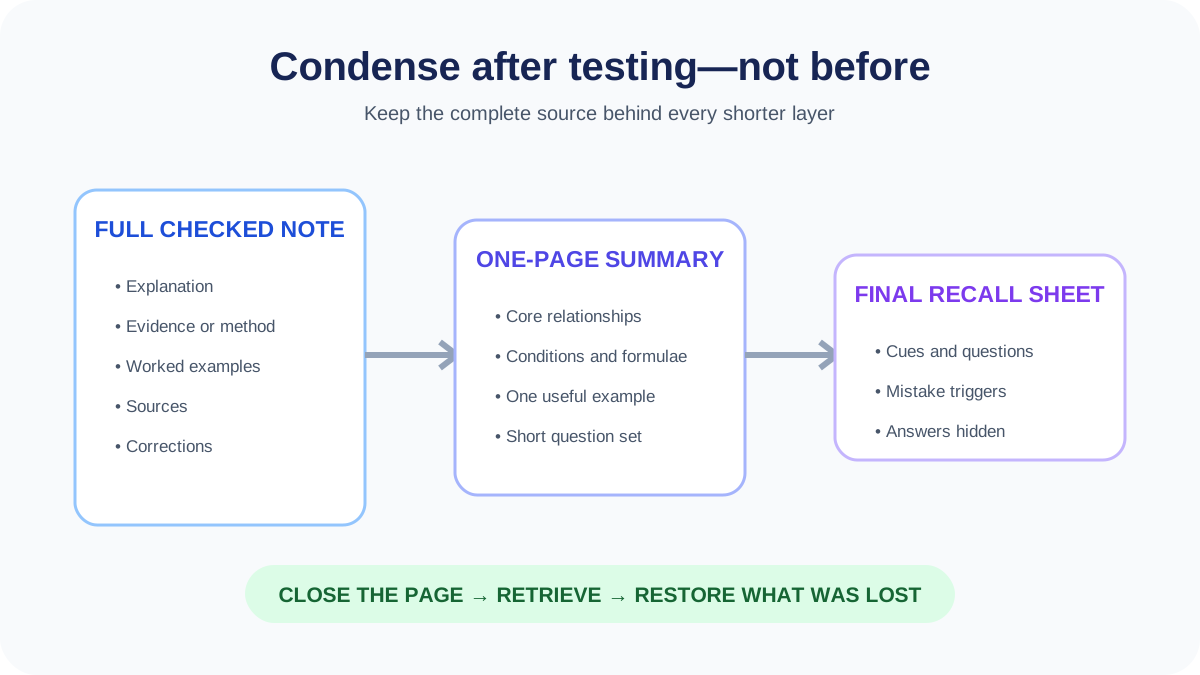
The final sheet points back to knowledge you have already checked. It is not a substitute for learning an unfamiliar topic.
Update the note after practice instead of starting again
Suppose your calculation used the right formula but omitted the unit. Add the relevant unit beside the formula and include it in the answer check. You probably do not need to rewrite the entire topic.
If an essay paragraph failed to address the question, add the command word and a reminder to link the reasoning back to it. If the difficulty was understanding the concept itself, return to a fuller explanation before compressing it again.
Use past-paper review to identify the gap, then retest it with the notes closed. The University of Minnesota’s retrieval-practice guidance provides background on using retrieval in learning. Here, the practical purpose is to make your next edit respond to a real difficulty.
A final check before filing the page
Can you find the source? Can you explain the central idea without reading? Is there one example showing how to use it? Does the recall question have a checkable answer? Have you recorded the error that needs another attempt?
If the answer is yes, put the note into your review routine. It does not need another colour scheme before you can use it.
Download and export notes without breaking the workflow
Choose an export format by what you will do next, not by which file looks most polished.
| Format | Best for | Check before relying on it |
|---|---|---|
| Plain text | Fast copying, search and low-friction backup | Headings, formulas and tables may lose structure |
| Markdown | Editable headings, lists and lightweight long-term storage | Preview tables, equations and image paths |
| Stable printing, annotation and sharing across devices | Page breaks, small text, clipped tables and selectable text | |
| Word document | Editing, comments and adding course-specific material | Styles, equation layout and unexpected pagination |
| Flashcard import | Moving checked prompts into a review system | Field order, separators, duplicates and answer visibility |
Before downloading:
- give the file a specific subject, topic and review date;
- keep the source reference and current syllabus identifier inside it;
- confirm every image, table, symbol and equation survived export;
- open the file on the device you will actually use;
- keep an editable master rather than editing several conflicting copies;
- avoid exporting copyrighted, confidential or restricted material without permission.
In Aripsy, signed-in Free users can export Markdown. Plain-text download is available in the export menu. PDF, Word and Anki-compatible exports depend on Pro access and the selected study output. Check current plan details before building a workflow around a particular format.
Using Aripsy to create exam notes
Aripsy can turn pasted study material into notes and flashcards. Signed-in Free users can try a document upload; ongoing PDF, PowerPoint and Word uploads are available on Pro. See current plan details. Check extracted document text against the original, especially diagrams, equations and complex formatting.
For a subject-specific structure, use the A-Level revision-notes workflow, which separates specification coverage, core explanations, evidence, and recall prompts.
A safe prompt is:
Turn this study material into concise exam revision notes. Separate core facts, explanations, examples, and active recall questions. Flag anything that should be checked against the source.
After generating notes, review important points against your class materials, textbook, syllabus, or mark scheme.
A 30-minute exam-note workflow
| Time | Task |
|---|---|
| 5 minutes | Choose one topic from the syllabus |
| 10 minutes | Read source material and write a rough note |
| 5 minutes | Shorten and organise the note |
| 5 minutes | Create recall prompts |
| 5 minutes | Answer one practice question or update your mistake log |
This is an example schedule, not a guaranteed improvement or fixed requirement. Use the final question to check whether the notes helped you recall and apply the topic. The study-techniques guide explains how to revisit it later.
FAQ
How long should exam notes be?
They should be long enough to preserve important detail but short enough to revise from. For one small topic, one page or less is often enough, but complex topics may need more.
Should I type or handwrite exam notes?
Either can work. Typing is faster for organising and editing, while handwriting can help some students slow down and process ideas. The method matters less than whether you test yourself afterwards.
Can AI create exam notes for me?
AI can create a useful first draft from your own material. You should still check important details against trusted sources and use the notes for understanding, recall, and practice.
What should exam-ready notes include?
Include a concise summary, the explanation behind key relationships, one checked example, common mistakes and questions you can answer without seeing the note. The exact structure should reflect the current assessment rather than a generic template.
How do I make condensed notes for last-minute revision?
Start from notes you have already checked and practised. Keep only the cues, formulas, conditions, evidence and mistakes you still need, then close the sheet and test whether those cues let you reconstruct the answer.
Should revision notes include practice questions?
Yes. Add recall, explanation and application questions, followed by suitable exam-style practice. Keep the answers hidden during an attempt and use mistakes to decide what the note needs next.
What is the best format for downloading exam notes?
Use Markdown or Word when you still need to edit, PDF when stable printing matters, plain text for simple backup, and a flashcard format for checked question-and-answer prompts. Always open the exported file and confirm that equations, tables and images survived.
Sources and further reading
Use these sources to check the study method, exam context, or learning-science idea before turning the article into your own revision plan.
- Stanford Center for Teaching and Learning: Cornell note method
- University of Minnesota: retrieval practice
- AQA: revision resources, specifications and past papers
- Cambridge International: learner guide
Next study steps in Aripsy
Keep the workflow practical by turning this guide into notes, recall tasks, or a saved study session.
Keep exploring
Learning Science
Use active recall, spaced practice, flashcards, and mistake review as parts of a realistic revision routine.
Explore Learning Science guides
Written by
Aripsy Study Team
The Aripsy Study Team creates practical revision guides designed to support learning, source checking, and active practice.