AI Computer Science Notes Generator
From binary logic to complex algorithms, Aripsy structures your Computer Science material into clear, logical notes that make study prep more effective.
Computer Science
Focused notes
Recall
Flashcards
Verify
Sources
Computer Science
Auto
General
Turn one focused source into structured notes, key concepts, and recall prompts, then continue in the full study tool.
Short answer
How can Aripsy help me revise Computer Science?
From binary logic to complex algorithms, Aripsy structures your Computer Science material into clear, logical notes that make study prep more effective.
Best input
Paste your Computer Science notes, definitions, examples, diagrams, or marked-up textbook extract for the topic you are revising.
Responsible use
Use Aripsy as revision support alongside your source material, specification, or mark scheme.
How Aripsy helps you study this material
From binary logic to complex algorithms, Aripsy structures your Computer Science material into clear, logical notes that make study prep more effective.
Why use this tool?
How to create study notes from your material
Common Questions
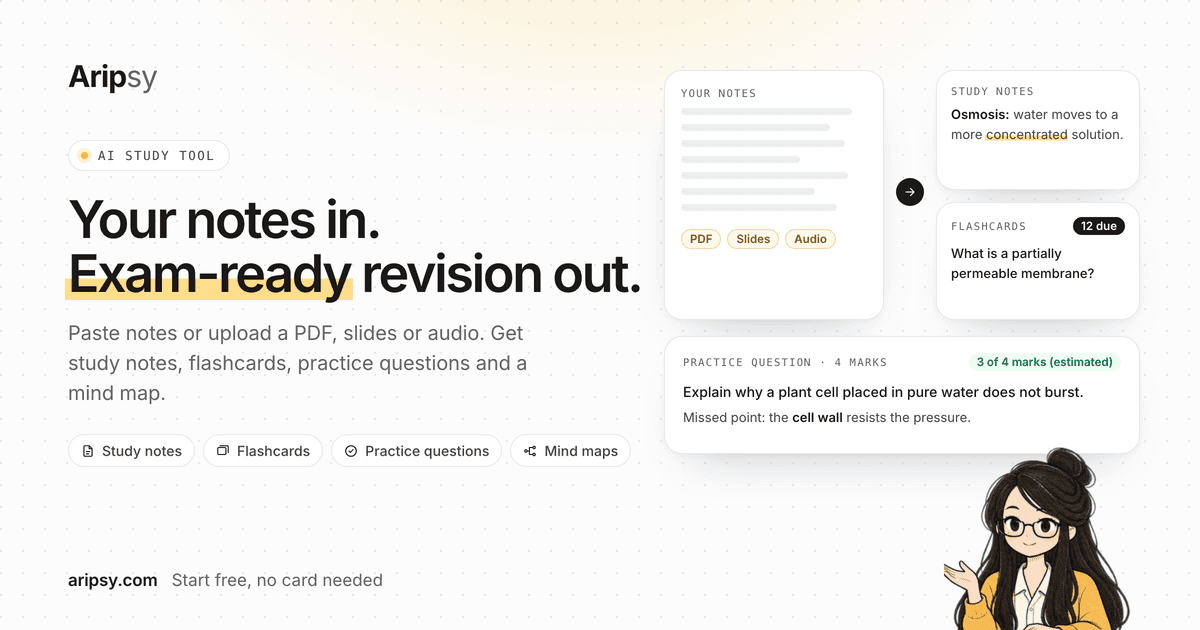
Product workflow preview
What the workflow looks like in Aripsy
Computer Science revision needs structured logic, pseudocode formatting, Big-O tables, and active recall for syntax. The screenshot shows the same Aripsy workflow students use to add material, choose study settings, generate notes, then build recall practice from the saved session.
Subject study workflow
Computer Science: Subject study workflow
Paste focused Computer Science class notes, textbook sections, worked examples, specification points, or study handouts for one topic at a time.
Popular topic areas
Computer science notes for theory and code concepts
Computer science revision spans algorithms, data structures, hardware, networks, databases, and programming theory. Aripsy helps turn scattered notes into structured sections.
Use it for algorithms and systems
Paste notes on sorting, searching, Big O, SQL, binary, networks, or operating systems. The tool can summarize definitions, steps, tradeoffs, and examples.
From CS notes to practice
Create flashcards for terms and algorithm steps, then test yourself with code tracing or past-paper questions. Aripsy supports revision, but coding skill still needs practice.
Check technical details
Verify generated pseudocode, syntax, complexity claims, and definitions against your course materials or documentation.
Useful student workflows
Algorithm & Data Structure Revision
Paste pseudocode or topic extracts on search algorithms, sorting, binary trees, or graphs to generate clean markdown notes with Big-O complexity tables.
CS Exam Terminology
Turn complex computer architecture, networking, or database concepts into atomic flashcards for quick daily recall.
Lab Code Catch-up
Convert lab notes and programming assignment explanations into clear revision summaries.
Computer science notes should connect theory with examples
Computer science revision can become too abstract if notes only list definitions. Strong notes explain the idea, show a small example, and identify where students often make mistakes. An algorithms section may include input, output, steps, complexity, and trace examples. A networks section may include protocols, layers, devices, and security implications. A databases section may include keys, relationships, SQL examples, and normalization concepts.
Useful CS topic clusters
A scalable computer science hub should connect algorithms, data structures, programming constructs, databases, networks, computer systems, cybersecurity, and theory of computation. These clusters match how students search and how courses are usually organised. They also prevent the site from producing many near-identical pages such as generic AI coding notes, algorithm notes, and programming notes with the same paragraph repeated.
Inputs that make CS notes better
Paste class notes, a textbook explanation, pseudocode, code-tracing examples, or revision feedback. For programming topics, include the language, concept, and example code if allowed by your course. Aripsy can structure the material into definitions, steps, examples, and practice prompts. Students should verify syntax, complexity claims, and exact pseudocode conventions against their course materials.
From CS notes to active recall
Computer science students can turn notes into flashcards for definitions, algorithm steps, network protocols, database terms, and hardware components. Practice prompts can test tracing, explaining tradeoffs, choosing a data structure, or identifying an error in pseudocode. This makes the subject page a useful hub while deeper curriculum pages handle individual topics in more detail.
Computer Science study workflow
A stronger computer science workflow starts with one focused topic, not a whole course at once. Paste a chapter section, class notes, worked example, or copied PDF text for a single area, then generate a structured note set. Review the output, correct anything unclear, and only then create flashcards or practice prompts. This keeps the page useful for learners and avoids generic programmatic copy that only swaps the subject name.
Computer Science topics to organize first
Most students searching for computer science notes need a cluster of related ideas, not one isolated keyword. Useful clusters for this subject include Algorithms, Data structures, Programming, Databases, Networks, Computer systems. A subject hub should help students choose the right cluster, understand what to paste into the tool, and move toward deeper topic pages where definitions, common mistakes, examples, and questions can be handled with more detail.
What to paste for better computer science output
The input quality matters. A focused computer science extract with definitions, examples, diagrams, equations, annotations, or feedback usually produces more useful notes than a broad request such as "make notes for this subject." If a student is on Free, they can paste text within the Free word limit. Pro users can upload PDF, PowerPoint (.pptx), or Word (.docx) files up to 15MB, then use the output for notes, flashcards, MCQs, and fill-in-the-blank practice.
Computer Science active recall plan
For computer science, students should test recall rather than only reread generated notes. Turn subject definitions into flashcards, turn computer science examples into short-answer prompts, and turn common mistakes into self-check questions. For exam preparation, students can compare their answers with trusted course materials and improve weak areas before the next session. This makes the computer science hub a practical learning page instead of a thin landing page.
Computer Science quality checklist before revision
Before relying on generated computer science notes, check that key terms are specific, examples match the source material, and practice questions test understanding rather than recognition alone. Remove vague points, add missing class examples, and keep any corrected wording in your own revision system. This quality step supports responsible AI study and makes the page better aligned with helpful-content expectations for students, tutors, and repeat revision sessions.
Computer Science next steps after notes
A subject hub should guide students toward a useful next action. After organizing computer science notes, students can open the study tool, make flashcards from corrected definitions, generate quiz prompts from a focused section, or move into curriculum-topic pages for deeper revision. This internal path helps users continue learning and gives search engines clearer context about how the subject page connects to the wider Aripsy study system. It also gives tutors, study groups, and self-learners a clear way to turn one source into multiple revision outputs without publishing duplicate pages for every small keyword variation.
Computer Science page quality signals
A useful computer science page should show real study intent: what to paste, what topics are covered, how to practise, and when to check the output. Those signals help the page serve students first while keeping programmatic SEO conservative, reviewable, and easier to improve over time.
Computer Science review loop after generation
The strongest use of an AI computer science notes page is a repeatable loop. First, paste a focused source and generate notes. Second, compare the output with the source and correct missing examples, unclear terms, or weak explanations. Third, convert the corrected material into flashcards, quiz prompts, or short written answers. Fourth, revisit mistakes in the next session instead of regenerating the same topic from scratch. This loop keeps students responsible for understanding while still saving time on structure, formatting, and first-pass organization.
Computer Science examples and error log
Students improve faster when examples and mistakes stay visible. After generating computer science notes, keep a short error log with the source title, the confusing term, the corrected explanation, and one example question to try later. For calculation-heavy or case-heavy topics, add the worked step, case fact, diagram label, statute point, symptom pattern, or study detail that caused the mistake. This turns the subject page into a practical study workflow: organize the source, correct the output, record weak points, then practise the exact point that failed.
Computer Science next revision action
After each computer science session, choose one next action: reopen the source, make flashcards, answer a practice question, or move to a related curriculum page. A clear next action keeps revision measurable and stops the page from becoming a passive summary. Review the next action before saving the session so later study starts from a specific weak point. Add one deadline or review date when the topic matters for an upcoming test.
Structuring Computer Science Concepts for Active Recall
Computer science revision requires a dual approach: understanding high-level logic (such as dynamic programming or recursive logic) and memorizing exact technical terminology (such as Big-O bounds, protocol layers, and SQL syntax). Aripsy structures raw CS notes into clear sections, formatting code blocks and comparison tables so students can test themselves on algorithmic steps without reading walls of dense text.
How Aripsy Assists CS Students vs. General Chatbots
General chatbots can explain code and create study prompts. Aripsy focuses on a saved revision workflow: structured notes with definitions, key pseudocode steps, Big-O complexity summaries, and flashcards that Pro users can export as an Anki-importable tab-separated .txt file.
Verifying Technical Pseudocode & Complexity Bounds
Always compare generated pseudocode and time complexity analyses with your official university syllabus or exam specification (AQA, OCR, Edexcel, or AP Computer Science). Verify edge-case behaviors and memory bounds against recommended textbooks.
Sources and further reading
These independent education resources inform the study habits discussed on this page. Always follow your teacher, tutor, specification, or official exam guidance first.
Topics supported
Ready to revise with less friction?
Start with your own material and build a clearer revision workflow.
Turn one focused source into structured notes, key concepts, and recall prompts, then continue in the full study tool.
Supported Subjects
Biology, Chemistry, Physics, Mathematics, History, Geography, Economics, Business, Psychology, Computer Science and English Literature.