PDF to Notes: Turn a PDF Into a Complete Study Guide
Turn one focused PDF section into exam-ready notes, convert each verified idea into a flashcard, create practice questions at several levels, and check every answer against the original pages before revising.
 Aripsy Study Team
In this article15
A 70-page PDF can produce hundreds of flashcards and still leave you unable to explain the topic. The usual problem is scope: too much source material goes into the generator, and too little checking happens afterwards.
Aripsy can reduce the manual conversion work, but the quality of any study set still depends on selecting a focused section, preserving context, and checking the output against the PDF.
Quick answer: how do you turn a PDF into notes and flashcards?
Use this workflow:
- Choose one examinable PDF section—often 5 to 15 pages is a practical starting point.
- Confirm that its text can be selected, copied, and read in the correct order.
- Extract the learning objectives, headings, key terms, processes, and exceptions.
- Write concise notes that preserve the context needed to understand each claim.
- Convert each verified, testable idea into one focused flashcard.
- Create practice questions at several levels of difficulty.
- Check every note, answer, and explanation against the original pages.
- Revise with active recall and repair weak cards or questions after use.
The worked examples below use a fictional introductory biology PDF about glycolysis. Its page numbers demonstrate a source-checking method; they are not citations to a real document.
Choose the right PDF section before making notes
Do not process an entire textbook simply because a tool accepts the file. A useful study set should cover one coherent unit that you could be asked to define, explain, compare, label, calculate, or apply.
In the fictional example, pages 42 to 51 begin with glucose entering glycolysis and end with pyruvate production. A later section starts aerobic respiration, so it belongs in a separate study set. That boundary prevents glycolysis cards from becoming mixed with the link reaction and Krebs cycle.
Use your specification, lecture objectives, or chapter headings to establish the boundary. Page count is only a rough control: five dense legal pages may contain more testable ideas than 20 illustrated science pages.
A focused section normally has:
- One main concept, process, case, or argument.
- Clear start and end points.
- Enough context to understand its key terms.
- A manageable number of diagrams and tables.
- Direct relevance to the assessment.
If the section produces more independent ideas than you can check in one sitting, divide it again. Students working from a full book can use the textbook-to-flashcards workflow to plan smaller chapter sets.
Check whether the PDF text is usable
PDF describes how content appears on a page; it does not guarantee clean extraction or reading order. Two documents that look similar on screen can produce very different copied text.
Try selecting a paragraph and pasting it into a plain-text editor. Check whether these elements survive:
- Headings and paragraph order.
- Symbols, superscripts, and subscripts.
- Formulas and scientific notation.
- Multi-column layouts.
- Table rows and column relationships.
- Footnotes and words split across lines.
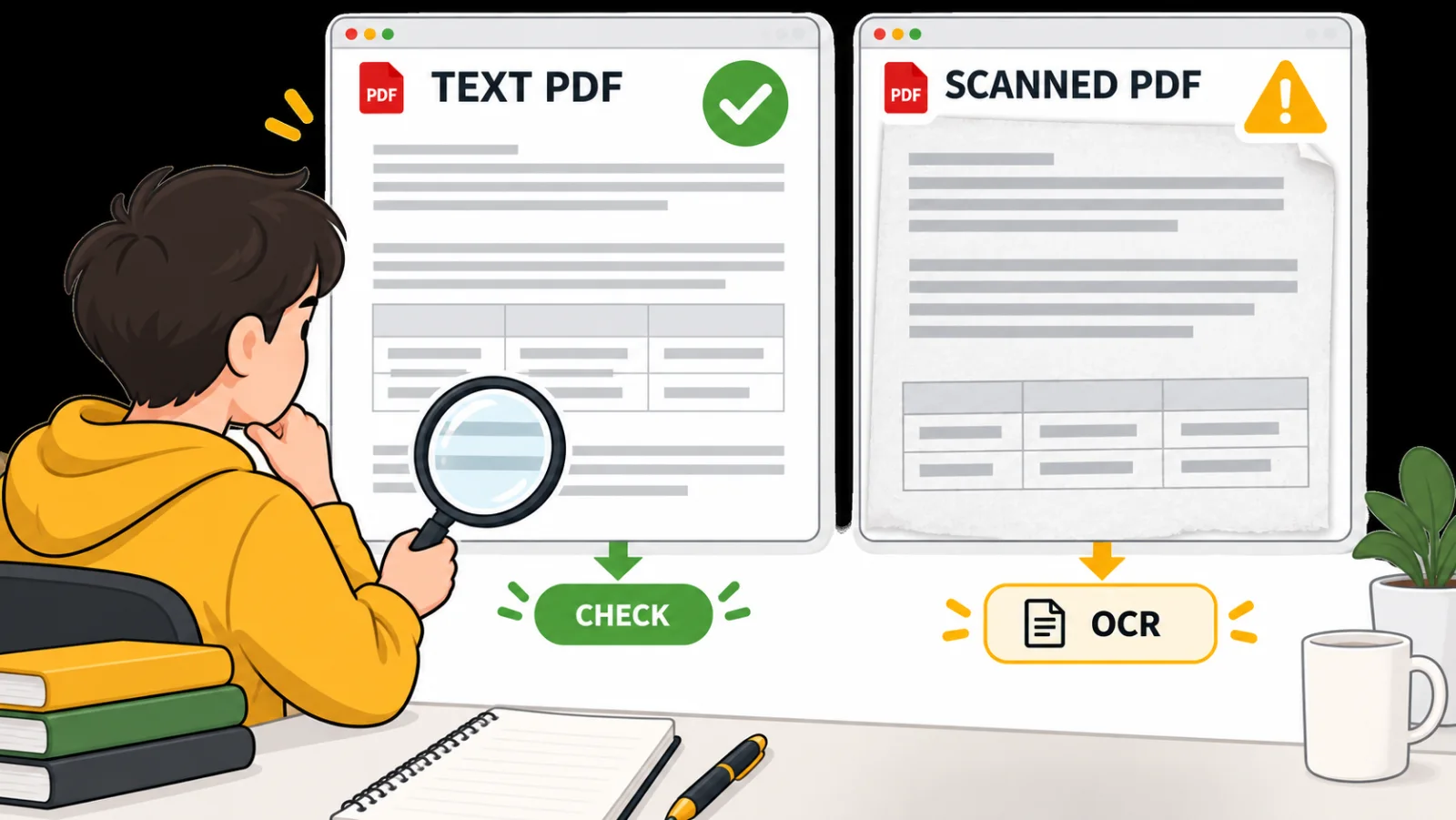
In the fictional glycolysis example, copying an enzyme table merges the substrate and product columns. A generator could then create a confident but incorrect flashcard from the broken row.
For a scanned PDF, optical character recognition can add selectable and searchable text. Adobe also advises reviewing the recognised text for accuracy and completeness afterwards. OCR is a preparation step, not proof that every symbol, table, or label was captured correctly.
Tagged PDFs can provide intended reading order and semantic structure for headings, lists, tables, and figures. If your course offers an accessible HTML or tagged-PDF version, it may be easier to extract reliably than an untagged scan.
Use only material you are authorised to access. Do not bypass password protection or upload restricted, personal, or assessment-protected content. The academic-integrity guide explains why allowed study assistance can differ from allowed assessed work.
Extract the testable material first
Read the selected pages once before asking a tool to summarise them. You are looking for the author’s structure, not trying to memorise every sentence.
Create a small source map with five categories:
| Category | What to capture |
|---|---|
| Objectives | What the learner should be able to explain or do |
| Core claims | The main facts, arguments, rules, or relationships |
| Vocabulary | Terms whose exact meaning matters |
| Processes | Ordered stages, mechanisms, or methods |
| Exceptions | Conditions, limits, contrasts, and common errors |
For the glycolysis example, the ten-step conversion of glucose to pyruvate is a process; the net energy yield is a core claim; phosphofructokinase is important vocabulary; and the distinction between gross and net ATP is a likely source of mistakes.
Attach page or figure references while extracting. A marker such as [p. 46] makes later checking faster. Keep lecturer additions, external facts, and mnemonics in a clearly labelled field instead of blending them into source-based notes.
Turn the PDF section into concise notes
Good notes preserve the structure needed to understand the topic while removing prose that does not support recall. They are not a shorter version of every paragraph.
For glycolysis, useful headings might include:
- Purpose and location.
- Energy-investment phase.
- Energy-payoff phase.
- Net products.
- Regulation and limiting conditions.
A weak note says, “Glycolysis is an important metabolic pathway with several stages.” It contains almost nothing testable.
A stronger note says, “Glycolysis occurs in the cytosol and converts one glucose into two pyruvate, with a net gain of two ATP and two NADH per glucose.” Those outcomes agree with the OpenStax glycolysis overview, but your own notes should still cite the assigned PDF rather than this example.
Do not compress linked events until causality disappears. If ATP is consumed to phosphorylate glucose, name what is consumed, what changes, and why that change matters. Use the terminology found in your course unless the source explicitly treats alternatives as synonyms.
For the action-oriented upload workflow, use the canonical PDF-to-study-notes tool. This guide covers the broader learning process after extraction: checking the notes, converting them into recall prompts, and repairing weak material.
PDF notes, summaries, flashcards, and questions solve different jobs
| Output | Best for | Main weakness | Best next step |
|---|---|---|---|
| PDF summary | Seeing the main structure quickly | Often too shallow for exam practice | Check coverage against headings and objectives |
| Study notes | Understanding and organising material | Can become passive if only reread | Add a closed-book prompt to every section |
| Flashcards | Retrieving compact facts and relationships | Poor for long explanations and multi-step problems | Mix with application questions |
| Practice questions | Explaining, calculating, comparing, and applying | Weak distractors or answer keys can teach errors | Verify every answer against the PDF |
For most exam topics, notes should come first when the source is new or difficult. Flashcards and questions should be created from the checked notes so extraction mistakes do not spread into every practice format.
Turn verified notes into effective flashcards
Each flashcard should test one retrievable idea. If one card asks for the location, purpose, inputs, products, enzymes, and regulation of glycolysis, getting it wrong tells you very little about the actual gap.
Start from checked notes rather than generating cards from every PDF sentence. The notes act as a reviewed intermediate layer and remove captions, references, repeated explanations, and extraction noise before they become prompts.
| Source fact | Concise note | Effective flashcard | Practice question |
|---|---|---|---|
| Glycolysis occurs in the cytosol | Location: cytosol | Where does glycolysis occur? → Cytosol | Why is glycolysis not classified as a mitochondrial pathway? |
| Two ATP are used and four are produced | ATP: 2 invested, 4 produced, net 2 | What is the net ATP yield per glucose? → 2 ATP | What is the net yield when six glucose molecules enter glycolysis? |
| One glucose forms two pyruvate | 1 glucose → 2 pyruvate | How many pyruvate form per glucose? → 2 | Account for the carbon atoms before and after glycolysis. |
| NAD⁺ accepts electrons | 2 NAD⁺ → 2 NADH | Which carrier is reduced? → NAD⁺ | What happens if NAD⁺ cannot be regenerated? |
Reverse a card only when the other direction exposes a different gap. “Which enzyme catalyses this step?” and “What does this enzyme catalyse?” are related but distinct; automatically reversing every card can double a deck without doubling its value.
Use cloze cards sparingly for sequences and precise statements. Hiding one important term can work well. Hiding five terms in a paragraph usually turns recall into guessing from grammar.
Add image cards when spatial information matters. A blank pathway diagram could ask the learner to label the investment and payoff phases. Retain the original figure reference so disputed labels can be checked.
For more card-design guidance, use lecture notes to flashcards and spaced repetition with flashcards.
Create practice questions from the same notes
Flashcards build fast retrieval, but exams can also require explanation, calculation, comparison, data interpretation, or transfer to an unfamiliar situation.
Use several levels of demand:
- Recall: State the net ATP yield of glycolysis.
- Explanation: Explain why gross ATP production differs from the net yield.
- Sequence: Put selected pathway events in the correct order.
- Application: Calculate the net ATP for a stated number of glucose molecules.
- Prediction: Predict the effect of failing to regenerate NAD⁺.
- Error correction: Identify and repair a flawed pathway statement.
Every question needs an answer and a source-supported explanation. Multiple-choice distractors should be plausible but clearly wrong according to the assigned material.
For example, “How many ATP molecules does glycolysis produce?” is ambiguous: four ATP are produced during the payoff phase, but two were invested, giving a net gain of two. Separate this into one question about gross production and another about net yield.
Map every question back to a heading in the notes. Ten questions about ATP do not adequately cover a source that also emphasises carbon flow, NADH, location, and regulation.
Use the quiz and MCQ quality guide for question design. The glycolysis pathway quiz shows how recall and explanation questions can work for this topic.
Check everything against the PDF
Treat generated output as a draft. Fluent writing does not establish accuracy, and an error becomes harder to correct after repeated rehearsal.
Check in two passes:
- Accuracy: verify numbers, definitions, causal claims, conditions, negatives, units, quotations, table relationships, and diagram labels line by line.
- Coverage: compare the finished set with the source headings, objectives, diagrams, worked examples, and summary tables.
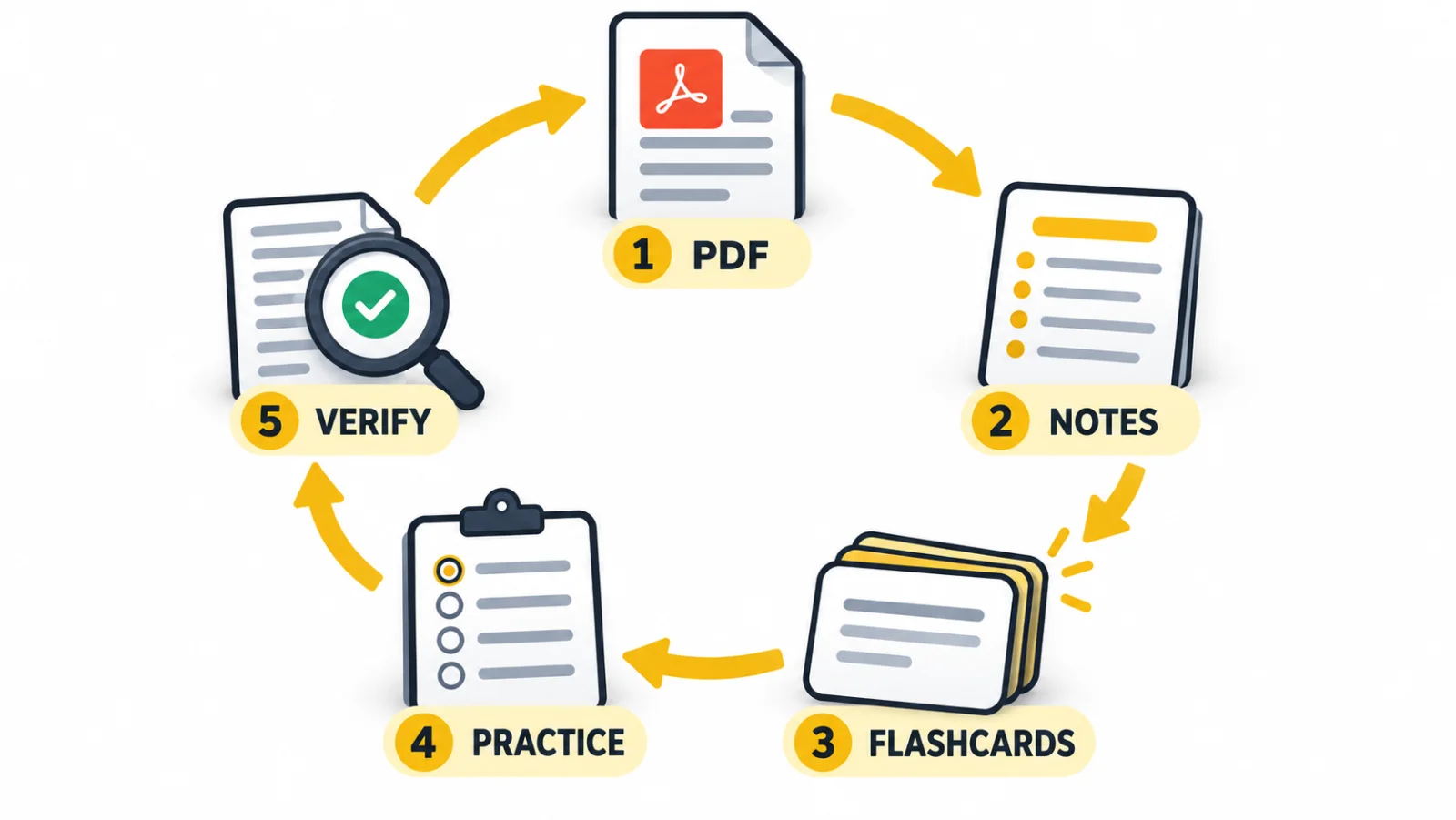
In the fictional example, checking catches three problems: the enzyme table was extracted in the wrong order, a card omitted the word “net,” and the notes included a regulatory detail that was not present in the selected pages. Correct the first two and either label the third as an external addition or remove it.
A simple confidence marker helps:
- Verified: supported by the source.
- Needs checking: the source location or wording is uncertain.
- Unsupported: not found in the selected source.
Do not keep “needs checking” or unsupported cards in the active deck. Prioritise numbers, negations, conditions, table relationships, and diagrams because extraction mistakes there can reverse the meaning.
How Aripsy fits the workflow
Aripsy brings notes, flashcards, and practice into a connected study workflow, but it does not remove the learner’s responsibility to select, check, and understand the material.
Signed-in Free users can try one successful PDF, PowerPoint, or Word upload. Ongoing document uploads up to 15MB are available on Pro. Aripsy extracts document text, so complex visuals and formatting should be checked. Pro also includes MCQs and fill-in-the-blank practice within the current plan allowances.
A careful Aripsy workflow is:
- Select one focused PDF section.
- Generate structured notes.
- Read the notes beside the source and correct extraction errors.
- Create focused flashcards from the checked material.
- Generate practice questions for the same topic.
- Check the answers against the original pages.
- Use missed questions to decide what to review next.
Start with the PDF-to-study-notes tool. If you are comparing broader platforms first, read the AI-powered study apps comparison.
Study the outputs in the right order
Reading generated notes once is orientation, not mastery. Close them and retrieve.
Begin with a blank-page attempt: write the main headings and reconstruct the process from memory. Check the notes, mark omissions, review the relevant cards, and finish with questions that require explanation or application.
Use mistakes to repair the set. If you repeatedly confuse gross and net ATP, make one contrast card and one calculation question. If you remember enzyme names but cannot place them in order, add a sequence or diagram task instead of more definition cards.
Research on test-enhanced learning found better delayed retention after retrieval practice than after repeated studying in the tested conditions. That does not mean every quiz is automatically useful: the questions, feedback, source accuracy, and match to the assessment still matter.
The practical distinction is explored further in active recall versus rereading.
Common mistakes when converting PDFs
Uploading too much
Start with one coherent topic rather than an entire book. Smaller sets are easier to verify and improve.
Accepting a polished but shallow summary
Compare it with the learning objectives and end-of-section questions. Readable notes may still omit equations, exceptions, or diagram labels.
Keeping overloaded flashcards
Split cards by decision point. Location, purpose, product, and regulation usually belong on separate cards unless the assessment expects one integrated explanation.
Using prompts that depend on hidden context
“What happens next?” becomes unusable when cards are shuffled. Name the stage or event in the question.
Rehearsing ambiguous distractors
Repeatedly seeing incorrect options can reinforce confusion. Explain why each important distractor is wrong and remove any option that could reasonably be defended.
Treating the generated set as a replacement for the source
Return to diagrams, worked examples, lecturer annotations, and prescribed definitions. Generated study material is a revision layer, not evidence that every source detail was captured.
FAQ
Can I turn a scanned PDF into notes and flashcards?
Yes, but use OCR first and inspect the extracted text. Check page order, symbols, tables, labels, and formulas. Handwriting, faint print, complex columns, or damaged scans may require manual correction.
How many PDF pages should I convert at once?
Five to 15 pages covering one coherent topic is a useful starting range, not a fixed rule. Density matters more than page count. Split the section when you cannot review and verify its testable ideas in one session.
Can AI make accurate flashcards from a PDF automatically?
It can create a useful first draft, but accuracy is not guaranteed. Verify every important answer against the source, especially numbers, qualifiers, equations, tables, and diagram labels.
Should I create notes or flashcards first?
Create and review concise notes first when the material is new, dense, or poorly extracted. Direct PDF-to-card generation is faster, but errors and missing context can spread across the deck.
How do I turn a PDF into flashcards for free?
Extract one readable section, create a source map, and turn its checked ideas into question-and-answer pairs. The dedicated free PDF-to-flashcards guide explains the workflow and current Aripsy plan distinction.
Does the same method work for PowerPoint slides?
Yes. Preserve slide titles, speaker notes, diagrams, and lecturer emphasis when available. Slides often contain less context than textbook prose, so check ambiguous claims against the lecture or assigned reading. See lecture slides to notes.
Are flashcards or practice questions better?
They solve different problems. Flashcards efficiently retrieve compact facts and relationships. Practice questions reveal whether you can explain, calculate, compare, and apply those ideas. A strong revision workflow uses both where the assessment requires them.
Sources and further reading
- Adobe: recognise text in scanned PDFs
- PDF Association: questions and answers about Tagged PDF
- OpenStax Biology 2e: Glycolysis
- Roediger and Karpicke: Test-Enhanced Learning
Final takeaway
The best PDF workflow does not stop at a summary. It moves one focused section through notes, flashcards, and practice questions, with source checking between each stage.
Use automation to remove repetitive conversion—not the judgment that makes the material trustworthy. Start small, verify the output, retrieve without looking, and let your mistakes decide what to revise next.
Keep exploring
AI Study Tools
Compare AI study apps by the job they do, the material they accept, and how easily students can check the output.
Explore AI Study Tools guides
Written by
Aripsy Study Team
The Aripsy Study Team creates practical revision guides designed to support learning, source checking, and active practice.