Best AI Flashcard Apps for GCSE Revision in 2026
For GCSE flashcards from your own checked notes, Aripsy is a good fit when you want subject and exam-context settings plus related practice. Knowt suits quick conversion of files and existing Quizlet sets; RemNote suits long-term scheduled review; Quizlet suits shared sets; NotebookLM suits several cited sources; and Revisely suits students who also want GCSE topic resources. Check every AI deck against your specification and mark scheme.
 Aripsy Study Team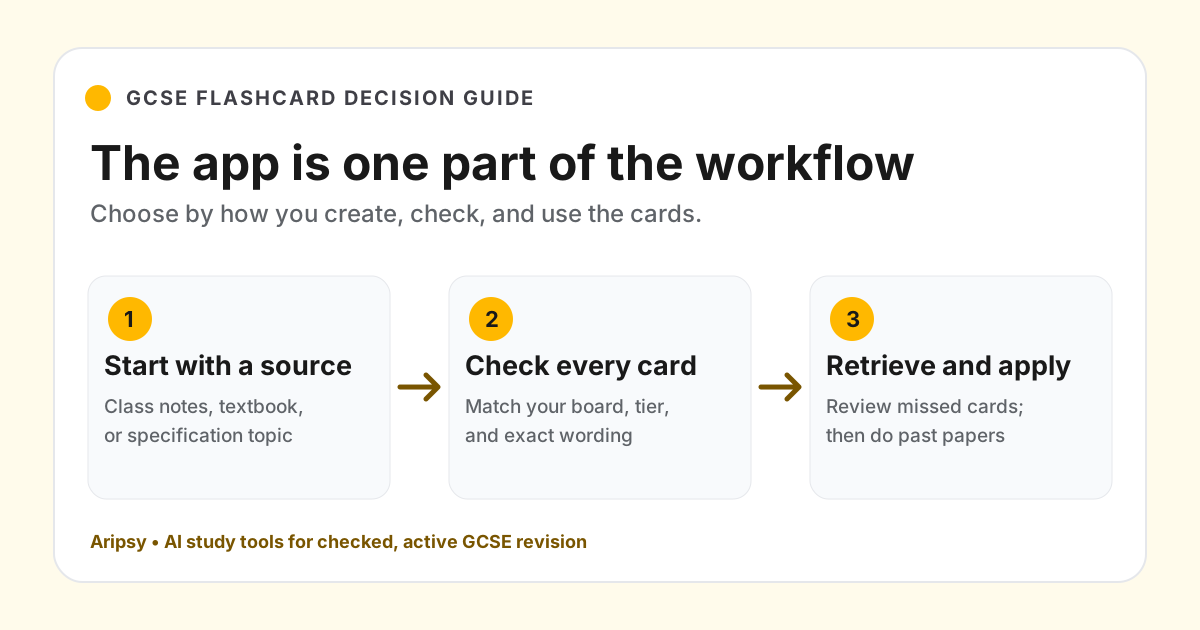
In this article7
The best AI flashcard app for GCSE depends on what you need after the cards are made. If you have class notes and want to turn one checked topic into recall cards, Aripsy is a useful choice. If you want a large daily review queue, RemNote may fit better. If your class shares Quizlet sets, that existing collection may matter more than a new generator.
Disclosure and method: Aripsy is our product. This is an editorial comparison of documented workflows, not a controlled test of card accuracy or a claim that one app raises grades. We checked each provider’s linked product or help pages on 6 October 2026. Access, limits and features can change. For every option, use your current GCSE specification and class materials to verify the content before memorising it.
Quick answer: which AI flashcard app should a GCSE student choose?
| Your main job | App to consider | Why it fits | Check before relying on it |
|---|---|---|---|
| Turn your own GCSE notes into cards and related practice | Aripsy | Source-based notes and flashcards with subject and exam-context settings | Generated facts and wording against the specification |
| Convert files quickly or bring over Quizlet sets | Knowt | File-based AI creation, imports and several review modes | Whether its current plan covers your chosen input and review mode |
| Keep cards inside notes for long-term review | RemNote | AI cards in a linked-note system with spaced repetition | Whether the setup and daily queue suit you |
| Use teacher or class sets | Quizlet | Shared decks, AI creation and familiar study modes | Whether the set matches your board and course |
| Ask questions across a pack of trusted sources | NotebookLM | Source-grounded flashcards, quizzes and explanations | Whether every required topic is in the source pack |
| Combine AI cards with GCSE topic resources | Revisely | GCSE subject and board resource pages plus an AI flashcard generator | The card output against the official specification |
This is a fit guide, not an accuracy ranking. We have not run the same GCSE material through all six products and scored their cards. Choose two plausible options, try the same small topic, then inspect each card before deciding.
What matters specifically for GCSE flashcards?
The word GCSE in a prompt does not prove that a card matches your qualification. AQA, Pearson Edexcel, OCR and other awarding bodies publish different specifications, and a single subject can have multiple routes or tiers. Check your exact course, subject and specification before accepting generated questions. For example, the AQA GCSE Biology 8461 bioenergetics specification names photosynthesis content and rate factors, while the OCR GCSE Biology A route has its own specification.
For this comparison, we look for four things: source control (can you use the notes you are actually revising?), card quality control (can you spot and fix vague or wrong prompts?), review (will difficult cards return?), and exam transfer (will you also practise calculations, explanations and past-paper questions?). A deck can be convenient but still leave out a required practical or test only definitions.
The six apps, with GCSE use cases and limitations
1. Aripsy: for cards from your own checked GCSE material
Aripsy turns pasted study text into notes and flashcards, with subject, level and curriculum settings to guide the output. Signed-in Free users can try one successful supported document upload; ongoing PDF, PowerPoint and Word uploads require Pro. A saved study session can connect notes, flashcards and further practice, depending on plan. The GCSE AI flashcard generator explains the actual source-to-card workflow.
That works well when a teacher handout, textbook section or corrected notes are your starting point. The limitation is that Aripsy extracts document text; diagrams, scans, tables and formula formatting need extra checking. Exam-context settings guide generation, but they do not certify specification coverage or mark-scheme wording. Use the original source and official specification as the check.
Choose it if: creating a focused, checked deck from your own GCSE material is the slow part of revision.
2. Knowt: for quick conversion and existing Quizlet sets
Knowt’s student guide documents Quizlet imports, AI creation from PDFs, slides, images and video, plus Flashcards, Learn, Practice Test and Spaced Repetition modes. Its AI flashcard maker page also describes pasted notes and PowerPoint input.
For a GCSE student with mixed class files or an existing Quizlet library, that range reduces re-entry work. Still check the current allowance for the input and mode you want, and inspect imported or generated cards for incorrect symbols, missing context and a different exam board’s wording.
Choose it if: you want several input types and familiar practice modes in one place.
3. RemNote: for notes and scheduled recall over a whole course
RemNote’s AI-card help explains creating cards from selected notes; its spaced-repetition guide explains how cards return for review. Its document reader also supports working from PDFs.
RemNote suits students willing to build a linked set of notes and review it regularly across months. The trade-off is setup: a simple one-topic deck may not need a full knowledge base. The scheduling cannot correct an inaccurate card, so edit before adding large AI batches to your queue.
Choose it if: long-term review matters more than the fastest first deck.
4. Quizlet: for shared class sets and familiar study modes
Quizlet’s AI flashcard generator can turn notes, slides and documents into editable cards. Quizlet’s flashcard page also describes creating, finding and studying shared sets.
That is useful if your teacher or classmates already maintain a set. Do not assume a popular public set matches your board, tier, text edition or teacher’s coverage. Quizlet’s Study Guides help also notes that access can depend on subscription, age and country, which matters for GCSE students.
Choose it if: shared sets and a familiar card workflow are your priority.
5. NotebookLM: for flashcards tied to several trusted sources
Google describes flashcards and quizzes made from notebook sources, with explanations that point back to those sources. This is useful when your GCSE topic is spread across class notes, a revision handout and a specification extract.
Its main GCSE limitation follows from that strength: if a required topic is absent or a source is outdated, source-grounded cards can still be incomplete. Use a focused source pack and compare its topic list with the current specification before treating the generated deck as a coverage checklist.
Choose it if: checking where a card came from is central to your revision.
6. Revisely: for a GCSE resource route alongside AI cards
Revisely’s GCSE pages group resources by qualification, subject and board, and point students to its AI flashcard generator. Its plan page lists AI deck creation with plan-dependent allowances.
The benefit is a GCSE-focused starting point. The limitation is the same as for any generator: check whether the cards cover your course and whether formulas, practicals and required wording survived the conversion. A linked resource page is not proof that every generated card has been checked against the latest specification.
Choose it if: you want GCSE topic resources next to a flashcard-making option.
A small GCSE Biology test you can run yourself
Use one paragraph from your own permitted AQA GCSE Biology notes on the rate of photosynthesis. The AQA specification lists light intensity, temperature, carbon dioxide concentration and chlorophyll amount as factors. Generate a short deck in two apps and compare:
| What to inspect | Weak card | Better card or action |
|---|---|---|
| One answerable target | “Explain photosynthesis.” | “Name one factor that affects its rate.” |
| Source fidelity | A card introduces an unverified figure or formula. | Check the wording against the exact specification and source paragraph. |
| Coverage | Cards test the equation only. | Add rate factors, graphs or practical points that your course requires. |
| Review | You flip cards without attempting answers. | Say or write the answer first, then mark misses for another review. |
This is a methodology example, not a claimed test result for any app. A good app should let you repair the weak deck. A good revision routine then uses the corrected cards to find gaps and past papers to practise applying knowledge under exam conditions.
Which option should you try first?
Start with one topic and your real source material. If your main task is producing cards from checked notes, try Aripsy’s GCSE flashcard workflow. If daily scheduled review is the main task, compare RemNote and Knowt. If your class has shared sets, inspect Quizlet before rebuilding them. If several sources need to stay traceable, try NotebookLM. Use Revisely when its GCSE resources match your course.
Whichever app you choose, keep the deck small enough to check. Verify important definitions, equations, quotations and practical details; revise missed cards later; and do questions that flashcards cannot simulate.
FAQ
What is the best free AI flashcard app for GCSE?
There is no stable universal winner because free allowances and age rules change. Test the exact input, card editing and review mode you need on the current plan pages. Aripsy Free supports pasted text and limited flashcards, with one successful supported document-upload trial after sign-in.
Can AI flashcards replace GCSE past papers?
No. Flashcards help with retrieval of terms, processes, formulas and examples. Past papers and mark schemes are needed to practise full explanations, calculations, timing and exam-specific wording.
Can I make GCSE flashcards from a PDF?
Several apps above accept PDFs. Check whether the file contains extractable text and inspect any diagrams, tables or equations against the original. In Aripsy, signed-in Free includes one successful supported document upload; ongoing uploads require Pro.
Do AI flashcards automatically match AQA, Edexcel or OCR?
No. A board selector or a board-labelled resource may guide the result, but you should check cards against your exact, current specification and teacher materials.
Sources and review notes
Product details above link to the providers’ own documentation. For course accuracy, start with your awarding body’s current specification and mark schemes, such as the linked AQA and OCR pages. This first-party comparison was checked on 6 October 2026 and should be revisited when products or GCSE specifications change.
Keep exploring
AI Study Tools
Compare AI study apps by the job they do, the material they accept, and how easily students can check the output.
Explore AI Study Tools guides
Written by
Aripsy Study Team
The Aripsy Study Team creates practical revision guides designed to support learning, source checking, and active practice.