How to Check AI-Generated Study Notes for Accuracy: A Student Verification Checklist
Check AI-generated study notes by tracing important claims to the original source, comparing the output with the source's headings and learning objectives, auditing exact details such as dates and formulas, confirming every citation, and correcting the notes before testing yourself without them.
 Aripsy Study Team
In this article11
AI-generated notes can be tidy, concise and wrong in a way that is difficult to notice. A changed unit, missing exception or invented quotation may look just as polished as a correct statement. That is why fluency is not evidence of accuracy.
The safest approach is to treat generated notes as an editable draft. Keep the original material open, verify the claims that matter, repair the draft and only then use it for revision.
Quick answer: how do you check AI-generated study notes?
Use the TRACE check:
- Trace claims to the original source.
- Review coverage for missing topics, conditions and exceptions.
- Audit precision in names, dates, definitions, numbers, formulas and units.
- Confirm evidence by opening every quotation, citation and link.
- Edit and self-test from the corrected version, with the notes closed.
If an important claim cannot be traced to a reliable source, do not memorise it yet. Mark it as unresolved and ask a teacher, tutor or subject expert when the available sources still disagree.
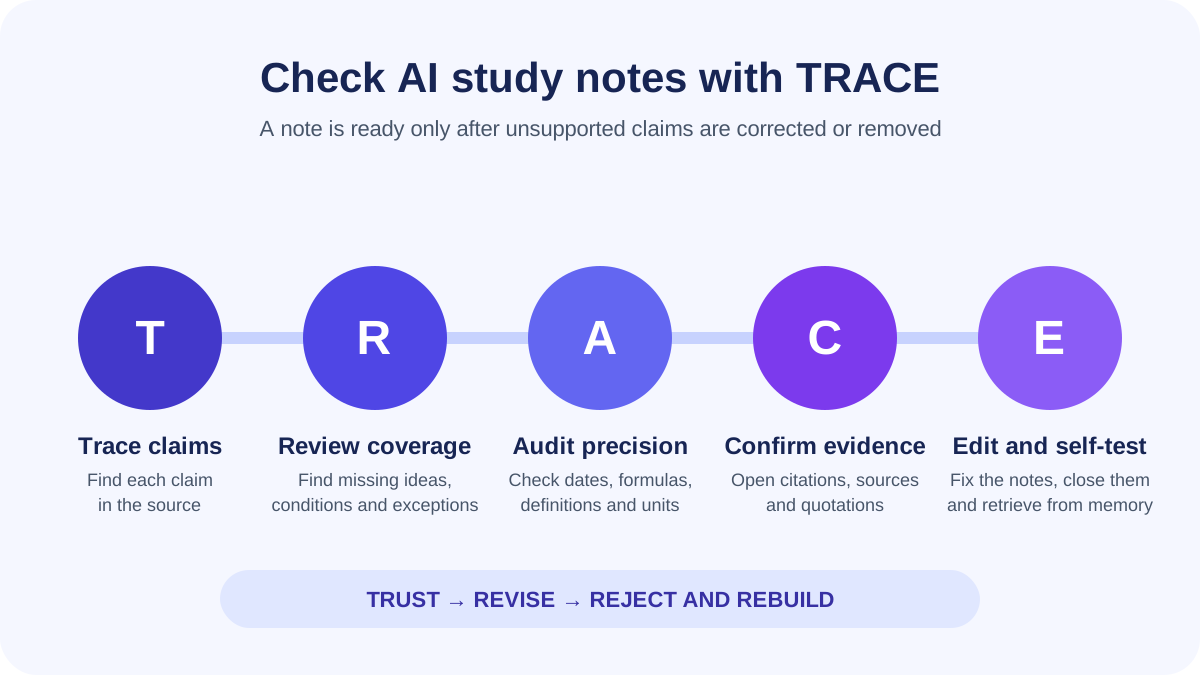
TRACE turns “double-check the notes” into five visible decisions. A note is not ready to study until unsupported claims have been corrected or removed.
Why accurate-looking AI notes still need checking
Generative AI produces plausible language; it does not certify each sentence against your course material. NIST includes confabulation—confidently stated but false or erroneous content—among the risks in its Generative AI Profile. Stanford’s student guide similarly warns that AI output can be inaccurate, misattribute a source or create a citation that does not exist.
For revision notes, errors usually appear in one of four forms:
- Unsupported additions: a detail sounds relevant but is not established by the material you supplied.
- Distortions: the note changes the source’s meaning, sequence or strength of claim.
- Omissions: a key stage, exception, counterargument or diagram is missing.
- Extraction errors: a document parser loses a symbol, table heading, footnote, column or image label before the notes are generated.
The last two are easy to miss. A note can contain no obvious false statement and still be unsafe because it leaves out what makes a statement true. “Rate increases with temperature” is incomplete if the source explains a range, optimum or limiting condition.
The TRACE verification checklist
You do not need to investigate every ordinary sentence with the same intensity. Start with claims that would cost marks if they were wrong: definitions, formulas, dates, quotations, causal links, required steps and conclusions.
1. Trace each important claim to its source
Put the generated notes beside the textbook section, lecture slide deck, specification or article used to create them. Work one claim at a time and ask:
- Where does the source support this?
- Does the note preserve the source’s meaning?
- Is the statement presented as fact, interpretation or example?
- Did the note add knowledge that was not in the supplied material?
Use a simple label beside each claim:
| Label | Meaning | Action |
|---|---|---|
| Supported | The source clearly supports the wording | Keep it |
| Partly supported | The core idea is present, but context or conditions are missing | Rewrite it |
| Unsupported | You cannot locate support in the source | Remove it or find an independent reliable source |
| Contradicted | The source says something materially different | Correct it before studying |
Do not ask the same AI system whether its own answer is correct and treat “yes” as verification. That is another response, not independent evidence.
2. Review coverage, not just individual facts
A fact check asks whether the notes say something false. A coverage check asks whether they left out something necessary.
Compare the note headings with:
- the source’s table of contents or section headings;
- the lesson’s learning objectives;
- the course or exam specification;
- required diagrams, practicals or worked methods;
- the questions your teacher expects you to answer.
Then look specifically for words that limit a claim: may, usually, except, only when, under these conditions, in this sample. If the shorter note deletes those words, it may turn a cautious finding into a universal rule.
A quick coverage grid helps when the source is long:
| Source section | Present in notes? | Accurate enough? | Repair needed? |
|---|---|---|---|
| Main concept | Yes / No | Yes / No | Add the missing explanation |
| Evidence or example | Yes / No | Yes / No | Restore the evidence |
| Conditions or exceptions | Yes / No | Yes / No | Qualify the claim |
| Diagram, table or process | Yes / No | Yes / No | Check against the original visual |
3. Audit the details most likely to change an answer
Run a precision pass for information that cannot safely be “approximately right”:
- names and spellings;
- dates and chronological order;
- definitions and subject terminology;
- statistics and sample descriptions;
- signs, exponents, brackets, formulas and units;
- cause and effect;
- sequences in a process;
- quotation wording and attribution.
For calculations, redo the worked example without looking at the generated solution. Check each transformation, the unit and whether the rule has conditions. A correct final number can hide invalid reasoning.
For a PDF or slide deck, inspect the extracted material as well as the final notes. Multi-column pages, scans, equations and diagrams can be misread before generation begins. If the input is damaged, regenerating from the same extraction may repeat the problem.
4. Confirm every citation, quotation and named source
A reference-looking string is not evidence that the source exists or supports the claim. The Stanford student AI guide advises students to consider which sources contribute to an AI response and whether they have been used accurately.
For each citation:
- Search the exact title and author in your library catalogue, Google Scholar or the publisher’s site.
- Confirm that the author, title, year and publication match.
- Open the source rather than trusting a search-result snippet.
- Find the relevant passage, table or result.
- Check that the source supports the precise claim—not just the general topic.
For quotations, verify the exact words in the original text and record a page, chapter, act or scene where appropriate. For a statistic, check the population, date, unit and denominator. A real paper can still be cited for a conclusion it never made.
5. Edit the notes, then test yourself without them
Do not leave a known error beside the correction. Delete or clearly strike out the wrong version so it cannot become the line you remember later.
For every correction, record a short source marker such as “lecture 4, slide 12” or “textbook, p. 86.” Mark unresolved points with a question rather than filling the gap with a guess. Add a reviewed date if the topic contains changing information.
Then close the notes and retrieve the idea from memory:
- state the definition precisely;
- explain why the process works;
- solve a fresh problem;
- compare two interpretations;
- answer a practice question and mark it against a trusted source.
This final step checks understanding as well as accuracy. Research on test-enhanced learning found that retrieving information can support longer-term retention more effectively than repeated study alone. The useful sequence is therefore verify, correct, retrieve—not generate, reread and hope.
Worked example: auditing a plausible but unsafe note
Imagine that a lecture source says:
Enzyme activity usually rises as temperature increases because particles have more kinetic energy. Above the enzyme’s optimum temperature, activity falls as the active site’s shape changes.
The generated note says:
Higher temperature always speeds up enzymes. At very high temperatures, the enzyme dies.
The draft is short and memorable, but it is not safe to learn unchanged.
| TRACE check | Problem found | Better note |
|---|---|---|
| Trace | “Always” is not supported | Activity usually rises only up to an optimum |
| Review coverage | The optimum temperature is missing | Include the turning point |
| Audit precision | “Dies” is imprecise terminology | State that the active site’s shape changes and activity falls |
| Confirm evidence | No outside citation is needed because the supplied lecture is the source | Record the lecture slide or textbook page |
| Edit and self-test | The original wording could still be remembered | Replace it, then explain the pattern with the notes closed |
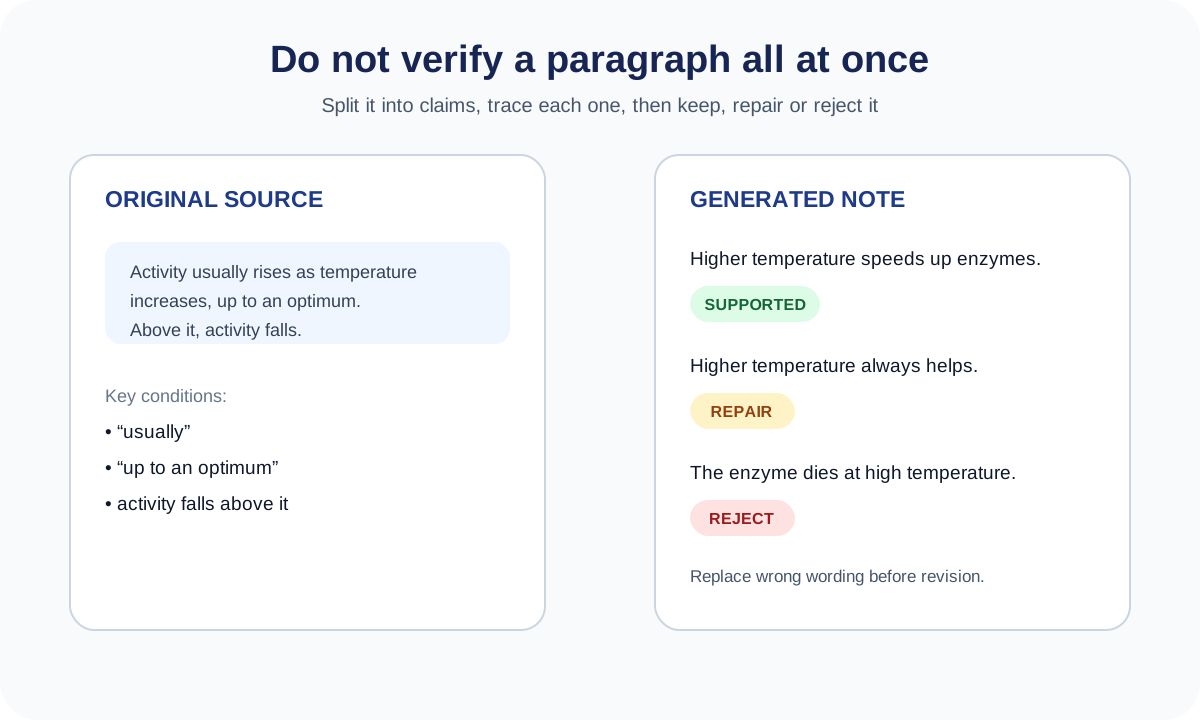
Audit individual claims instead of approving a polished paragraph as one block. A partly correct sentence may still need a condition restored.
Notice that verification is not a hunt for spectacular hallucinations. Most useful corrections are small: restoring one condition, replacing one vague word or reconnecting a conclusion to its evidence.
Subject-specific accuracy checks
The TRACE process stays the same, but the highest-risk details vary by subject.
Biology, chemistry and physics
- Match definitions, equations and required practicals to the current course specification.
- Check units, symbols, significant figures and graph labels.
- Preserve conditions such as temperature, pressure, concentration and direction.
- Compare process sequences with the original diagram; prose alone may lose spatial relationships.
- Distinguish observations from explanations and hypotheses from established conclusions.
Maths, statistics and economics
- Rework every example line by line.
- State where a formula applies and define each variable.
- Check minus signs, powers, brackets, rounding and units.
- Verify the base rate, denominator, time period and sample behind a percentage.
- Test the rule on a second example, including an edge case where possible.
History, politics and social sciences
- Check names, dates, locations and chronology.
- Separate a primary source’s statement from a historian’s interpretation.
- Restore uncertainty and competing explanations.
- Check whether evidence from one place, period or group has been overgeneralised.
- Confirm that a quotation actually belongs to the named speaker and context.
English and other text-based subjects
- Find every quotation in the assigned edition.
- Check who speaks, to whom, and at what point in the text.
- Treat interpretations as arguments that need evidence, not settled facts.
- Keep alternative readings where the course expects evaluation.
- Do not let a summary replace reading the passages you will analyse.
Medicine, law and other high-stakes subjects
Use stricter standards. Check current official guidance, legislation, protocols or primary literature, and seek qualified human review where a mistake could affect a person rather than only a practice exercise. A study-note checklist is not a substitute for professional judgement.
How much verification does each note need?
Use a risk-based check rather than trusting notes because they “look right.”
| Situation | Verification level | What to do |
|---|---|---|
| Generated only from a topic prompt | High | Verify every substantive claim against reliable course sources |
| Generated from a clean source you supplied | Medium | Compare claims and coverage with that source; check additions separately |
| Contains quotations, citations or statistics | High for those items | Open and verify each one individually |
| Contains equations, tables or diagrams | High for those elements | Compare with the original and redo calculations |
| Covers a familiar, low-stakes topic | Targeted | Check high-value facts and a sample from each section |
| Covers an unfamiliar or high-stakes topic | Very high | Use authoritative sources and accountable human review |
Source-grounded notes are easier to audit because you know what to compare, but “generated from my document” does not mean “guaranteed correct.” Extraction can fail, context can disappear and unsupported material can still be added.
When to repair the notes and when to start again
Repair the draft when the structure is useful and the errors are limited: a missing condition, an imprecise definition or a few omitted examples.
Start again from a cleaner source or write the notes manually when:
- several central claims are unsupported or contradicted;
- headings do not match the source’s topic structure;
- the output invents citations or quotations;
- an equation, scan, diagram or table was extracted incorrectly;
- corrections would take longer than rebuilding the note;
- you cannot explain where the information came from.
If two credible sources disagree, do not force a false resolution. Record the disagreement and the contexts in which each source applies, then ask your teacher what the course expects.
Reduce errors before generating the first draft
Verification starts before you press generate.
- Use a focused section rather than an entire book or course.
- Supply material you are permitted to use and identify its subject and level.
- Ask the output to preserve conditions, exceptions and uncertainty.
- Request a “not established by the source” label instead of invented gap-filling.
- Keep tables, equations and diagrams available for manual comparison.
- Never upload confidential, personal or restricted material without permission.
You can generate study notes from one focused source, then apply TRACE before turning the result into revision material. Aripsy works from pasted study text and supported documents, but AI-generated material can still contain mistakes, and complex visuals or formatting need checking against the original.
After the notes are corrected, use the quiz-from-notes workflow to create draft practice questions, check the answer key against the same source and review mistakes. If you want the wider decision process, read how to choose an AI study notes generator. For rules around assessed work, use the academic integrity guide.
AI hallucination checklist for students: copyable version
Before revising from generated notes, confirm:
- [ ] I can identify the original source for this set of notes.
- [ ] Every important definition, date, formula, number and causal claim is traceable.
- [ ] The notes cover the source’s main headings and learning objectives.
- [ ] Conditions, exceptions, uncertainty and counterarguments were preserved.
- [ ] Equations, units, diagrams, tables and process steps match the original.
- [ ] Every citation exists and supports the sentence attached to it.
- [ ] Every quotation is exact and correctly attributed.
- [ ] Unsupported additions were removed or verified independently.
- [ ] Corrections replaced the wrong wording and include a source marker.
- [ ] I can explain or apply the topic with the notes closed.
- [ ] My use of AI follows the rules for this course and task.
FAQ
Are AI-generated study notes accurate?
They can contain useful summaries, but accuracy varies by model, prompt, source quality and subject. Treat them as a draft. Check important claims and omissions against the original material before revising from them.
What is the fastest way to fact-check AI notes?
Check high-risk details first: definitions, dates, numbers, formulas, units, quotations, citations and cause-and-effect claims. Then compare the source headings with the note headings to catch omissions. Correct the file before you study it.
Can I ask AI to verify its own notes?
You can ask it to identify claims for review, but its response is not independent verification. Confirm important points using the original course material, an authoritative source or a qualified person.
Are notes generated from my own PDF automatically reliable?
No. Providing a source makes verification easier, but text extraction can lose symbols, columns, footnotes and diagram relationships. The generated notes may also omit context or add unsupported details.
What should I do if AI notes conflict with my textbook?
Check the textbook edition, course specification and another authoritative source. If the conflict remains, mark the point as unresolved and ask your teacher or tutor before memorising it.
Should I verify every sentence?
Use more scrutiny where the cost of error is high. Verify all key claims in unfamiliar or high-stakes material. For familiar, low-stakes notes, check every precision detail and sample claims from each section rather than trusting the document after one correct paragraph.
Sources and further reading
- Stanford Center for Teaching and Learning: AI and Your Learning
- NIST: Artificial Intelligence Risk Management Framework—Generative AI Profile
- University of Minnesota Libraries: Output Reliability and GenAI
- Stanford CRAFT: How Do I Fact-Check AI Search Results?
- Roediger and Karpicke: Test-Enhanced Learning
Keep exploring
AI Study Tools
Compare AI study apps by the job they do, the material they accept, and how easily students can check the output.
Explore AI Study Tools guides
Written by
Aripsy Study Team
The Aripsy Study Team creates practical revision guides designed to support learning, source checking, and active practice.