Best PDF-to-Practice-Question Tools for Students (2026)
The best PDF-to-practice-question tool depends on the job. Aripsy is a strong fit for turning focused course PDFs into connected notes and exam practice; Gemini Notebook is useful when questions must remain tied to several sources; Knowt combines file-based assessments with study modes; Quizlet offers familiar practice tests; ChatGPT Study Mode is the flexible option; and Formester suits students or educators who need a publishable scored quiz.
 Aripsy Study Team
In this article16
A PDF-to-practice-question tool should do more than pull definitions from a document and place them behind answer choices. The useful tools help you select a focused source, generate questions that match the kind of thinking your course requires, attempt them without looking, inspect the answer key and return to the exact material when something looks wrong.
That distinction matters. Practice testing and distributed practice received high-utility ratings in a major review of learning techniques, and experimental work has found that retrieval can support longer-term retention better than repeated study under the conditions tested. But an AI-generated question is not automatically good retrieval practice. A faulty answer key, an ambiguous distractor or a question based on a misread table can rehearse the wrong idea.
This guide compares six current tools by the complete workflow: PDF input, question control, answer checking, revision after mistakes and practical limitations.
Disclosure: Aripsy publishes this comparison and is one of the products included. We reviewed current official product or help documentation on 5 October 2026. Features, limits, prices, age rules and regional availability can change, so confirm any essential requirement before subscribing.
Quick answer: what is the best PDF-to-practice-question tool?
Choose Aripsy when you want to turn a focused course PDF into notes, flashcards and exam-practice formats in one student workflow. Choose Gemini Notebook when several PDFs or sources need to remain visible and cited. Choose Knowt for file-based assessments plus multiple study and classroom modes. Choose Quizlet for a familiar practice-test workflow built from uploaded notes or sets. Choose ChatGPT Study Mode when you want flexible, one-question-at-a-time tutoring from a selected PDF section. Choose Formester when the final result needs to be a publishable, scored quiz rather than a private revision session.
There is no defensible universal winner without testing the same PDFs, questions and marking criteria across every platform. The right choice is the one that fits your source, course and next study action.
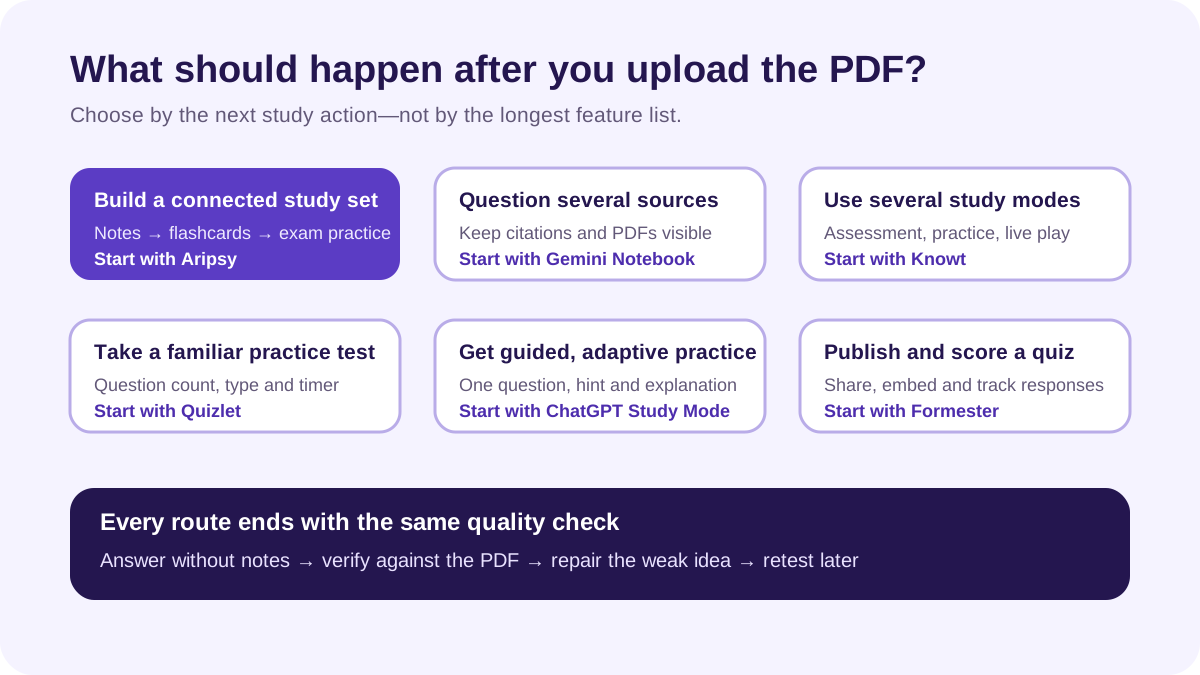
Six PDF-to-practice-question tools compared
| Tool | Best fit | PDF-to-question workflow | Useful question or review options | Main limitation |
|---|---|---|---|---|
| Aripsy | Students building an exam-focused study set from their own material | Supported PDF upload after sign-in; one successful document-upload trial on Free, with ongoing uploads on Pro | Notes, flashcards and practice questions; Pro adds MCQs and fill-in-the-blank practice | Text extraction can miss complex diagrams or formatting; generated material needs checking |
| Gemini Notebook | Studying across several trusted PDFs and course sources | PDFs can be added as notebook sources | Native quizzes and flashcards with difficulty and focus controls; source-grounded chat | Good grounding does not repair missing, outdated or incorrect source material |
| Knowt | Students or teachers who want an assessment plus several study modes | Kai can create an assessment from PDF, PPT, video or audio | Multiple choice, true/false and free response; editing, grading and study modes | AI usage, limits and available modes depend on account and plan |
| Quizlet | Students already comfortable with sets and practice tests | Upload notes or a supported file, or start from a set | Multiple-choice or written questions, question count and timer controls | Practice Tests have subscription, language, age and regional conditions |
| ChatGPT Study Mode | Flexible tutoring and custom questioning from a chosen section | Upload a PDF when file uploads are available, then specify pages or sections | One-at-a-time questions, hints, explanations and follow-up practice | Less structured than a dedicated saved test workflow; can make mistakes |
| Formester | A shareable, scored quiz for a class, tutor group or study group | Its AI quiz maker accepts PDFs alongside prompts and text | Editing, scoring, sharing, embeds and response tracking | Broader form-building setup than many students need for private revision |
How we evaluated the tools
We did not award points for the longest feature list or repeat each company’s claim that it is “best.” We used six practical questions:
- Can it use the student’s own PDF? A topic-only generator does not meet the same need.
- Can the student control the output? Question type, focus and difficulty are more useful than a fixed generic quiz.
- Can answers be checked? The source or original pages should remain available for verification.
- Does it support retrieval? The learner should answer before seeing the solution.
- What happens after a mistake? Explanations, editing or follow-up practice make the result more useful.
- Are the limitations clear? Scans, diagrams, equations, file limits and account restrictions affect real use.
We did not run a controlled head-to-head test, so the recommendations describe workflow fit rather than proven learning outcomes or question accuracy.
1. Aripsy: best for a connected PDF-to-exam-practice workflow
Aripsy’s study tool is designed to move from source material into a revision set. A student can upload a supported text-based PDF, generate structured notes, check the important claims and continue into flashcards or practice material. Pro adds ongoing document uploads, MCQs and fill-in-the-blank practice within the current plan limits.
That connected workflow is the main advantage. The PDF does not have to become one giant quiz. A biology student can isolate a section on cell signalling, confirm the terminology in the generated notes, make recall cards for mechanisms and then create application questions. A history student can separate factual recall from evidence comparison and argument prompts.
Signed-in Free users can try one successful PDF, PowerPoint or Word upload. Ongoing supported uploads up to the current file limit require Pro. Aripsy extracts document text, so scanned pages, equations, tables, captions and diagram-dependent questions need extra inspection. It does not supply an official exam-board question bank, and generated questions are not official past-paper questions.
Best for: students who want one path from their own course material to checked notes and several types of active-recall practice.
Not the best fit when: your main need is interrogating dozens of research sources with inline citations or publishing a formal assessment to a class.
2. Gemini Notebook: best for questions across several sources
Gemini Notebook is useful when one topic is spread across a lecture PDF, a reading, a syllabus and another trusted source. PDFs can be added to a notebook, and its Studio can generate native quizzes and flashcards. Current help documentation describes difficulty controls and a prompt field for specifying the audience, style or focus.
The strongest reason to choose it is source visibility. You can question the notebook and inspect citations while comparing material across sources. That makes it a better fit than a single-file generator for literature reviews, long university modules or topics where two documents need to be reconciled.
Source grounding still needs judgment. The notebook can only work with what you provide. If the current syllabus is absent, a lecture contains an error or a diagram is not interpreted correctly, a grounded response can still be incomplete or misleading.
Best for: students who need quizzes and source-linked discussion across multiple course documents.
Not the best fit when: you want an exam-board-specific workflow or a tightly structured path from notes to several saved practice formats.
3. Knowt: best for assessment and study-mode variety
Knowt’s assessment workflow can build questions from a PDF, PowerPoint, video or audio source. Its current documentation lists multiple-choice, true/false and free-response questions, along with editing, assignment and live-play options. Students can also use flashcards, Learn, Practice Test and spaced-repetition modes around their material.
This breadth makes Knowt useful when the same source should support private study and a class activity. A student can generate material from a PDF, revise the draft and practise it; a teacher can edit the assessment before assigning it.
The trade-off is complexity and plan dependence. Different AI actions and study modes can have access limits. As with every generator, inspect the answer and distractors before using an assessment. Knowt also warns that text entered for AI features is sent to third-party AI providers, so sensitive or restricted material should not be uploaded.
Best for: students and teachers who want several study or delivery modes from the same source.
Not the best fit when: you want the simplest possible private PDF-to-question workflow.
4. Quizlet: best for a familiar practice-test experience
Quizlet Practice Tests can generate questions from uploaded notes or flashcard sets. Students can select the number of questions, choose multiple-choice or written formats and set a timer before taking the test and reviewing the result.
This is a natural option for someone who already organises material in Quizlet. The path from a set or uploaded notes to a timed test is familiar, and the result can sit beside an existing flashcard routine.
Access needs careful checking. Quizlet’s official help page lists subscription, language, age and country conditions for Practice Tests, with limited free access. The feature currently focuses on science and humanities material. A public set may also contain errors or follow a different course version, so use your own checked source wherever possible.
Best for: students who already use Quizlet and want a straightforward practice test from their material.
Not the best fit when: access conditions exclude your account or you need several kinds of output from the same PDF.
5. ChatGPT Study Mode: best for flexible guided questioning
ChatGPT Study Mode can work with an uploaded PDF when file uploads are available. Instead of requesting “make a quiz,” you can identify the exact pages, ask for one question at a time, require an attempt before feedback and request a new question that tests the same idea in a different way.
That conversational control is its strength. It works well when you want hints, layered explanations or a tutor-style exchange rather than a static batch of questions. A precise request can specify level, topic, question form, number of questions and how feedback should be delivered.
It is also the least structured option in this list. You decide how to organise the questions and what to save. Study Mode can make mistakes, and file handling varies by account and workflow. Ask it to identify the page or passage supporting each answer, then check the PDF yourself.
Best for: students who want adaptive questioning and are comfortable directing the session.
Not the best fit when: you need a durable assessment, automatic class reporting or a fixed study-set structure.
6. Formester: best for a shareable scored quiz
Formester’s AI Quiz Maker accepts a prompt, text or PDF and produces an editable quiz. Its broader form workflow supports scoring, sharing, embedding and response tracking, which separates it from tools focused mainly on private student revision.
Choose it when other people need to take the result. A tutor might turn a reading into a short pre-session check, or a study group might share a quiz and compare which items caused difficulty. Editing before publishing is essential: verify the key, remove ambiguous questions and confirm that the PDF is material you are allowed to process and share.
The additional publishing controls can be unnecessary if only one student will use the questions. In that case, a study-focused tool usually creates less setup work.
Best for: publishable quizzes with scoring and response collection.
Not the best fit when: you only need a quick private revision session.
Why Anki and Brainscape are not in the main ranking
Anki and Brainscape are useful review systems, but they do not meet the central criterion for this comparison: a direct, first-party workflow that takes a PDF and creates practice questions from it. They are better treated as destinations for checked cards or questions created elsewhere.
Use Anki when detailed spaced-repetition control matters and you already have verified prompts. Use Brainscape when confidence-based card review suits your routine. Neither should be described as a PDF question generator merely because third-party add-ons or manual copying can connect the steps.
How to turn a PDF into useful practice questions
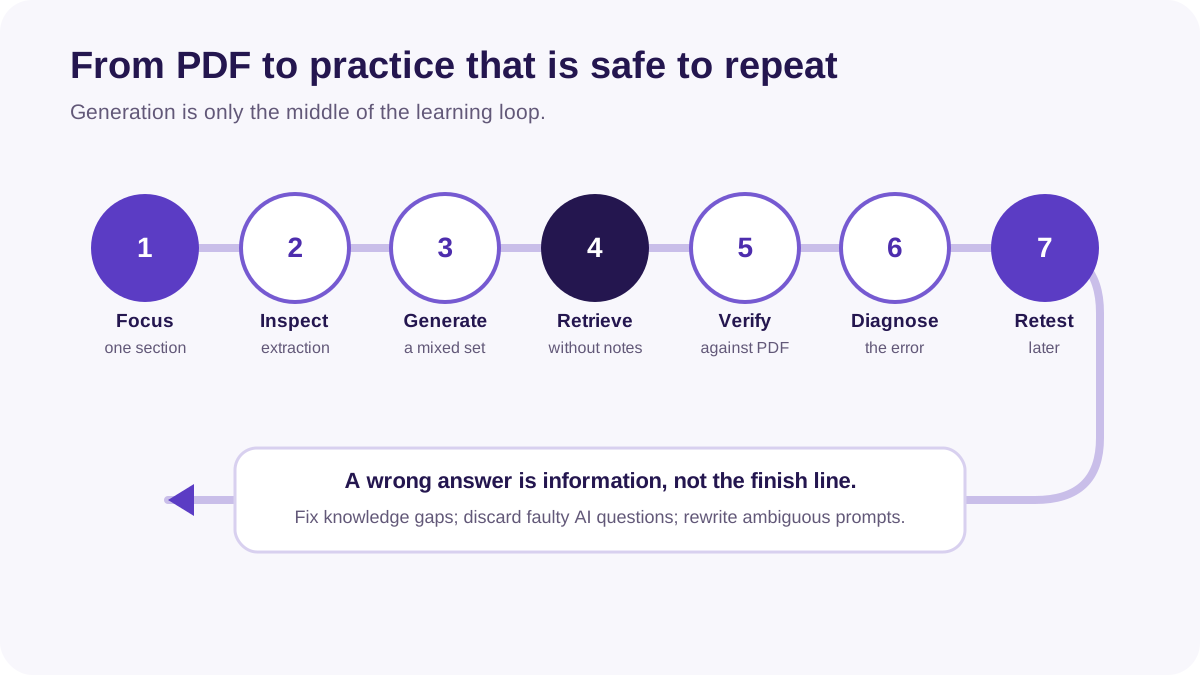
The tool matters less than the checking loop. Use this process with any of the six options:
- Choose one assessable section. A chapter subsection or one learning objective is easier to verify than an entire textbook.
- Inspect extraction first. Confirm that headings, symbols, tables and definitions survived the upload.
- Request a deliberate mix. Combine recall, explanation, comparison, application and—when appropriate—calculation questions.
- Answer without the PDF open. Retrieval happens before the source is revealed.
- Check every key against the source. Do not assume fluent wording means the answer is supported.
- Label each error. Separate a knowledge gap from a misread question, calculation slip or ambiguous AI item.
- Repair and retest later. Create a new question for the weak idea instead of memorising one answer position.
A quality checklist for AI-generated questions
Before studying from a generated set, check:
- Source support: Can you point to the page or passage behind the answer?
- Single best answer: Does an MCQ have one defensible correct option?
- Plausible distractors: Are wrong options based on realistic misunderstandings rather than nonsense?
- Course relevance: Does the question test a learning objective rather than a minor footnote?
- Appropriate demand: Does the wording match the recall, explanation, calculation or evaluation skill you need?
- Complete context: Are units, diagrams, data and qualifications present?
- Useful feedback: Does the explanation show why the answer works and why a tempting alternative fails?
For a deeper checking process, use the student verification checklist for AI-generated study material. If a question fails the source, clarity or answer-key checks, edit or discard it rather than practising it repeatedly.
Which tool should you choose?
| If your priority is… | Start with… |
|---|---|
| A connected exam-study workflow from one focused course PDF | Aripsy |
| Quizzes grounded across several PDFs or trusted sources | Gemini Notebook |
| Assessment creation plus varied study and classroom modes | Knowt |
| A familiar timed practice test around existing sets or notes | Quizlet |
| Adaptive tutoring and one-question-at-a-time feedback | ChatGPT Study Mode |
| A shareable scored quiz with response tracking | Formester |
| Long-term review after the questions have been checked | Anki or Brainscape as a follow-on system |
Try the same representative section before committing to a tool. Use one page with definitions, one with a table or equation and one question requiring explanation. The most useful platform is the one whose output you can verify and actually revisit—not the one that produces the largest question count.
FAQ
Can AI turn a PDF into practice questions?
Yes. Tools including Aripsy, Gemini Notebook, Knowt, Quizlet, ChatGPT Study Mode and Formester can use uploaded material in question or quiz workflows. Exact file support, limits and access vary. Scanned pages, equations, tables and diagrams require extra checking.
What is the best PDF-to-practice-question tool for students?
There is no universal winner. Aripsy is a strong fit for connected notes and exam practice from focused course material; Gemini Notebook is useful across several cited sources; Knowt offers broad assessment and study modes; Quizlet provides familiar practice tests; and ChatGPT Study Mode offers flexible guided questioning.
Is there a free PDF-to-quiz generator?
Several services provide free access or trials, but limits change by account, region and date. Aripsy lets signed-in Free users try one successful supported document upload. Quizlet describes limited free Practice Test access. Confirm the current plan before uploading a large study library.
Are AI-generated practice questions accurate?
Not always. A generator can misread the PDF, omit context, create two plausible MCQ answers or supply an incorrect explanation. Check every important answer against the original pages and remove ambiguous items.
Should I upload an entire textbook PDF?
Usually not. Start with a focused, legally obtained section that matches one learning objective. Smaller inputs are easier to extract, question and verify. Do not upload copyrighted, confidential or personal material unless you have permission and the provider’s data terms fit your situation.
Are practice questions better than rereading?
Research supports practice testing as a broadly useful learning technique, particularly when students retrieve answers and receive corrective feedback. That does not make every generated quiz effective: question quality, spacing, feedback and source accuracy still matter.
Final recommendation
Start with the workflow, not the logo. Choose one focused PDF section, generate a small mixed set, answer without notes and verify every key. If the tool helps you find and repair weak understanding, it is doing useful work. If it creates polished but shallow or unsupported questions, a larger batch will only multiply the problem.
For an exam-focused source-to-practice workflow, open the Aripsy study tool. For the broader process of converting one PDF into checked notes, flashcards and questions, read PDF to Notes, Flashcards and Practice Questions.
Sources and further reading
- Association for Psychological Science: Test-Enhanced Learning
- Association for Psychological Science: Improving Students’ Learning With Effective Learning Techniques
- Gemini Notebook Help: Generate Flashcards or Quizzes
- Knowt Help Center: Create an Assessment
- Quizlet Help Center: Studying with Practice Tests
- OpenAI Help Center: Using Study Mode
- Formester: AI Quiz Maker
Keep exploring
Find a study workflow
Choose the source, output, or course route that fits your next study task.
Browse study workflows
Written by
Aripsy Study Team
The Aripsy Study Team creates practical revision guides designed to support learning, source checking, and active practice.